No pods added to your quote request yet. Add some now for a free quote!
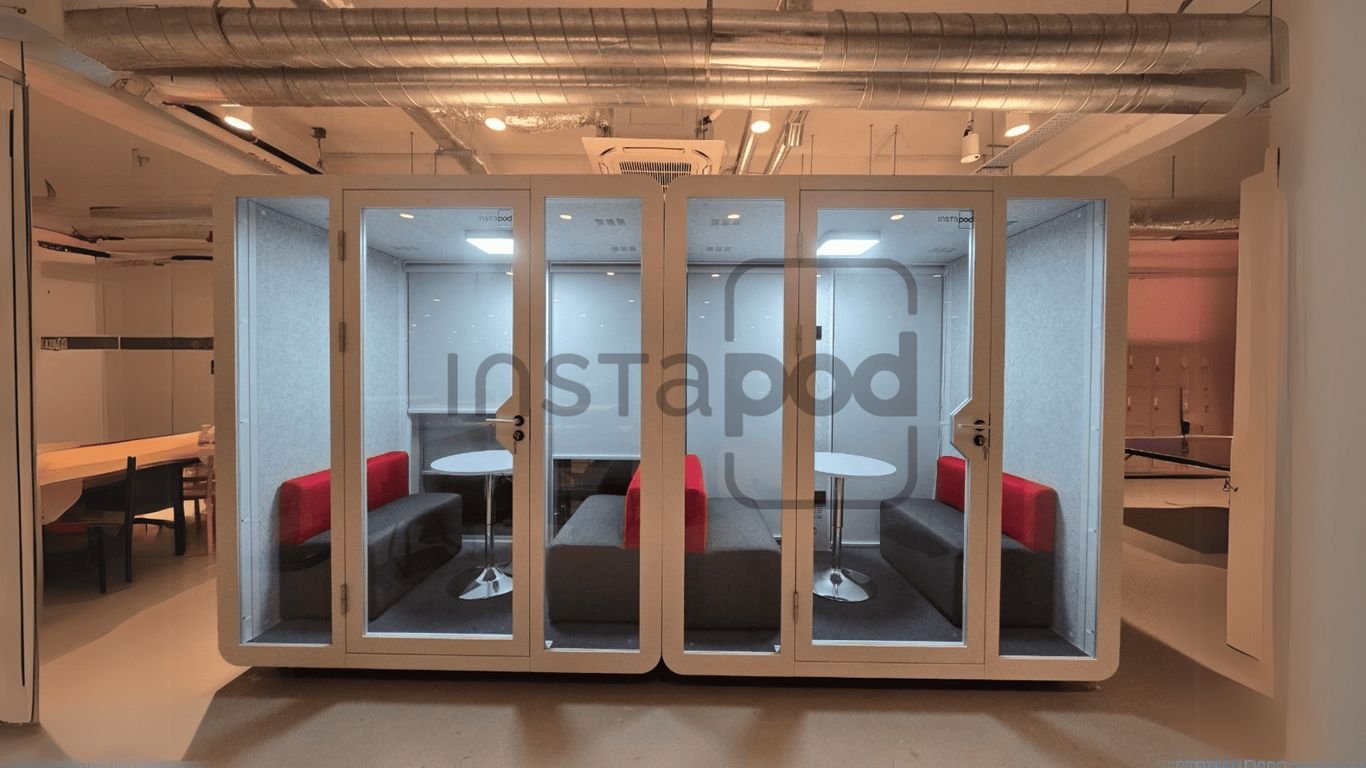
Let’s be honest, video calls at work can be a real pain. You’re trying to get your point across, but there’s always someone walking by, the printer is going off, or just general office noise. It’s distracting, and it doesn’t make you sound or look your best. That’s where workplace pods come in. These little private spots are changing how we do video calls, making them clearer, quieter, and way less stressful. If you haven’t tried one yet, you might be surprised at how much of a difference they make.
Key Takeaways
- Workplace pods offer a quiet space for video calls, blocking out most office noise and distractions.
- They are built with sound-dampening materials, so your calls sound clear and professional.
- Pods come with features like good lighting, ventilation, and built-in tech, making them comfortable for longer meetings.
- You can find different sizes and designs, so there’s usually a pod that fits your office and how your team works.
- Using workplace pods instead of building new rooms saves money, time, and keeps your workspace flexible.
Transforming Video Calls With Workplace Pods
Let’s be honest, video calls can be a real struggle in a busy office. You’re trying to sound professional, but there’s always someone walking by, a printer humming, or general office chatter in the background. It’s distracting for you and for the person on the other end. That’s where workplace pods, like a modern office telephone booth, come in. These private spaces are changing the game for remote communication, making calls clearer and less stressful.
Boosting Audio Quality and Clarity
If your audio is bad, your whole message can get lost. Workplace pods are designed to fix this. They use sound-dampening materials to block out the usual office noise. This means your voice comes through clearly, and you can actually hear what the other person is saying without them having to repeat themselves.
Here’s a quick look at how pods help:
- Reduced Background Noise: Pods significantly cut down on distractions like keyboard typing, conversations, and equipment sounds.
- Improved Voice Clarity: The acoustic design absorbs sound, reducing echo and making speech easier to understand.
- Professional Impression: Consistent, clear audio makes you and your company sound more professional.
The difference in audio quality between a noisy open office and a well-designed pod is night and day. It’s not just about sounding better; it’s about being understood.
Ensuring Comfort with Ventilation and Lighting
It’s not just about sound. If a pod is stuffy or poorly lit, people won’t want to use it, especially for longer meetings. Good pods have:
- Controlled Ventilation: Systems that keep the air fresh and prevent that stuffy feeling.
- Adjustable Lighting: Options for bright, clear light that’s good for video and doesn’t strain your eyes.
- Ergonomic Seating: Comfortable chairs that make sitting for a while much more bearable.
Integrating Technology and Connectivity
Modern pods often come with built-in tech to make things easy:
- Power Outlets & USB Ports: Keep your devices charged.
- Optional Screens: For sharing presentations or having a larger view of participants.
- Stable Wi-Fi/Network Access: Reliable internet connection for uninterrupted calls.
Key Features That Make Workplace Pods Effective
Workplace pods aren’t just fancy boxes; they’re built with specific features that directly impact how well your video calls and focused work sessions go. Getting these right means the difference between a useful tool and just another piece of office furniture. Let’s break down what really matters.
Prioritizing Soundproofing and Acoustic Ratings
This is probably the biggest reason pods are so popular. When you’re on a call, the last thing you want is to hear office chatter, keyboard clicks, or hallway noise. Good pods are designed to keep that outside noise out and your conversation private. They use materials that soak up sound, like thick acoustic panels on the walls and ceilings. The doors also seal up tight, which makes a big difference. A high STC (Sound Transmission Class) rating means the pod is really good at blocking sound from getting in or out. This is super important for sensitive calls, like talking to HR or a client, where you don’t want anyone else overhearing.
| Feature | What it Does |
|---|---|
| Acoustic Wall Panels | Absorbs sound, stops echoes, and muffles noise |
| Sealed Door & Windows | Prevents sound leaks from the outside |
| High STC Rating | Blocks a significant amount of sound |
The result is a quiet space where you can actually hear the person on the other end clearly, and they can hear you without distractions.
Ensuring Comfort with Ventilation and Lighting
No one wants to sit in a stuffy, dark box, even for a short call. Pods need to be comfortable if people are actually going to use them. That means good airflow is a must. Most decent pods have built-in fans that keep the air fresh, so you don’t feel like you’re running out of oxygen after ten minutes. Lighting is also key. You want something bright enough to see clearly on camera, but not so harsh that it’s uncomfortable. Many pods offer adjustable lighting, so you can set it just right for your call or work session. It might seem minor, but being comfortable makes a huge difference in how long you can focus and how productive you feel.
Integrating Technology and Connectivity
To be truly effective, a pod needs to be more than just a quiet room. It needs to support the technology you use for video calls. This usually means having:
- Power outlets: So you can charge your laptop or phone.
- USB ports: For easy device charging.
- Reliable Wi-Fi or network access: So your connection doesn’t drop mid-meeting.
- Optional integrated screens or mounts: For presentations or better camera positioning.
Having all these elements built-in means you can walk into the pod, plug in, and start your call without fiddling with cables or searching for an outlet. It removes a layer of friction that can make video calls more stressful than they need to be.
When these features work together, a workplace pod becomes a reliable, comfortable, and functional space that genuinely improves your video call experience.
The Role Of Workplace Pods In Hybrid Workplaces
Hybrid work is the new normal, and it brings its own set of challenges, especially when it comes to video calls and maintaining focus. Workplace pods, or workpods, are stepping in as a pretty neat solution for a lot of these issues. They help make sure everyone has a decent spot to work from, whether they’re in the office or at home.
Providing Consistent Meeting Quality Anywhere
Think about it: one day you’re in a quiet home office, the next you’re trying to take a call in a bustling open-plan office. The difference in background noise and distractions can be huge, right? Workpods help level the playing field. They offer a private, quiet space that’s pretty much the same, no matter where it’s set up. This means your audio and video quality stays good, and you don’t have to worry about someone walking behind you during an important client meeting.
- Reliable audio and video for every call.
- Blocks out distracting background sounds.
- Gives you privacy, even in busy areas.
Workpods create a stable, predictable environment for communication, which is a big deal when people are spread out. It takes away a lot of the guesswork and frustration that comes with inconsistent meeting setups.
Bridging The Gap Between Home and Office Environments
Switching between working from home and coming into the office can feel like two different worlds. Your home setup might be cozy but chaotic, while the office could be loud and full of interruptions. Pods help make these two worlds feel more alike. For remote workers, a pod can be a dedicated space that signals ‘work time.’ In the office, they offer a quiet retreat from the general buzz. This consistency makes the transition smoother and helps everyone get into their work groove faster.
| Challenge | Traditional Setup | Using Workplace Pods |
|---|---|---|
| Background Noise | Frequent | Rare |
| Privacy Concerns | Common | Minimal |
| Work-Life Blend | High | Low |
| Call Quality Variation | High | Low |
| Space Adaptability | Rigid | Flexible |
Defining Clear Work-Life Boundaries
It’s super easy for work to creep into personal time when you’re working from home. A dedicated workpod, whether at home or in the office, acts as a physical boundary. Stepping into the pod means it’s time to focus on work. When you step out, you can mentally switch off. This separation is really important for preventing burnout and maintaining a healthy balance between your professional and personal life. It’s a simple way to reclaim your downtime.
Choosing Workplace Pods Over Traditional Meeting Spaces
When you’re looking to upgrade your office for better video calls and a more focused work environment, it’s worth considering how workplace pods stack up against the old-school meeting rooms. Let’s break down why these pods are often a smarter choice than the usual drywall and conference table setup.
Avoiding The Hassle Of Conventional Construction
Honestly, building or renovating a standard meeting room can be a real pain. Think about the noise, the dust, the time it takes, and the costs that just keep climbing. Opting for pods cuts down on a lot of that chaos. You can get pods installed with hardly any disruption to your daily work. No waiting around for permits, no weeks of waiting for a room to be finished. Pods can fit right into your existing office layout, whether you have a small space or a big open plan. They give you that privacy and sound control without dragging your team through a messy construction project.
The process of setting up pods is generally much smoother and faster than traditional construction, leading to less downtime and fewer headaches for everyone involved.
Offering Flexible and Modular Solutions
Pods aren’t just a one-and-done deal; they’re built to adapt as your workspace needs change. You can reconfigure, move, or even add to these pods as your business grows or your priorities shift. Here’s what that flexibility looks like:
- Portability: Most pods are modular, meaning you can take them apart and move them if you rearrange your office or relocate.
- Variety: They come in different sizes, from small office phone booths for solo calls to larger pods for small teams.
- Adaptability: You can mix and match designs to suit how your team actually works, rather than forcing everyone into the same type of room.
Cost-Effectiveness Compared To Renovation
It’s no secret that traditional conference rooms can be a big financial commitment. Between the actual building, furniture, utilities, and upkeep, the expenses add up quickly. Pods can help you save money without making the office feel less professional. Take a look at this quick comparison:
| Feature | Traditional Meeting Room | Workplace Pod |
|---|---|---|
| Installation Time | Weeks to months | Hours to days |
| Flexibility | Fixed structure | Portable & modular |
| Initial Cost | High | Lower upfront |
| Soundproofing | Average | Superior |
| Office Disruption | High | Low |
Enhancing Concentration and Productivity With Workplace Pods
Ever feel like your brain is just fried by the end of the day, even if you didn’t get much done? A lot of that has to do with constant interruptions. In a busy office, it’s easy to get pulled in a million directions. People stopping by your desk, phones ringing, the general office buzz – it all adds up. Workplace pods offer a simple way to get away from all that noise and chaos.
Minimizing Interruptions For Deep Work
Think about the last time you were really in the zone, working on something important. Then, someone needed to ask a quick question, or a loud conversation started nearby. Poof! Your focus is gone. Pods create a quiet bubble where you can actually get that deep work done. They’re like a personal sanctuary for your brain. This means fewer distractions, which directly translates to better quality work and less time spent trying to get back on track.
- Reduced background noise: Significantly cuts down on ambient office sounds.
- Visual privacy: Prevents visual distractions from people walking by.
- Controlled environment: You decide who enters and when.
Improving Task Completion Rates
When you’re not constantly being pulled away from what you’re doing, you naturally get more done. It’s pretty straightforward. Instead of spending 15 minutes trying to regain focus after each interruption, you can have longer, uninterrupted work sessions. This leads to finishing tasks faster and feeling more accomplished at the end of the day. It’s not magic; it’s just giving your brain the space it needs to concentrate.
Here’s a look at how things can change:
| Metric | Before Pods | With Pods | Impact |
|---|---|---|---|
| Frequent interruptions/hour | 12 | 3 | -75% |
| Focused work blocks (mins) | 15 | 40 | +167% |
| Tasks completed per day | 7 | 12 | +71% |
Reducing Stress-Related Complaints
All those interruptions and the constant effort to focus can really take a toll. It leads to frustration, fatigue, and yes, stress. By providing a quiet, private space, pods help lower that daily stress load. You feel more in control of your work environment, which makes the whole workday feel less overwhelming. People tend to be happier and more engaged when they don’t feel like they’re fighting a losing battle against distractions.
Having a dedicated space to escape the office hubbub can make a surprising difference in your overall mood and how much you dread coming to work. It’s about creating pockets of calm in a busy day.
Strategic Placement And Utilization Of Workplace Pods
Getting the most out of your working pods really comes down to where you put them and how people actually use them. If you just stick these pods wherever there’s a bit of empty space, odds are they’ll end up being ignored. Thoughtful placement is key to making sure these private spaces are actually used and appreciated.
Locating Pods For Maximum Accessibility
Pods need to be close enough so no one has to go on a scavenger hunt to find one when they need it. Think about placing them near common work areas, main walkways, or even close to break rooms. This way, when someone needs a quiet spot for a quick call or some focused work, it’s not a hassle to step in.
Here are some tips for good placement:
- Spread pods out so different teams or departments have easy access.
- Avoid hiding them in obscure corners; keep them visible and inviting.
- Don’t crowd them all together—people value a quiet, separate space.
Consider this simple table showing how placement affects usage:
| Placement Option | Accessibility | Usage |
|---|---|---|
| Near workstations | High | Very High |
| By entrance/exit | Medium | Medium |
| Tucked away upstairs | Low | Rare |
When pods are easy to find and use, you’ll notice people stop pacing the office with laptops, looking for a private spot. It just makes daily work life smoother.
Balancing Open Space and Private Zones
It’s easy to think pods are a one-size-fits-all solution, but they shouldn’t take over the entire office. You want to balance these private areas with open zones so the workspace doesn’t feel cramped or boxed in. Too many pods clustered together can make the space feel smaller than it is. Instead:
- Position pods against walls or use them to naturally break up large open areas.
- Leave enough space between pods for easy foot traffic and to maintain the existing office flow.
- Mix solo and small group pods to match your team’s varied needs.
Pods are a great way to add privacy without sacrificing the collaborative feel of an open office. They create pockets of quiet focus within a larger, more dynamic environment.
Encouraging Adoption Through Visibility
Making your working pods visible is half the battle. If people don’t know they’re there or don’t see others using them, they might hesitate to try them out. Place them in well-trafficked areas, perhaps near common resources like printers or coffee stations. Clear signage can also help. When employees see their colleagues using the pods successfully for calls or focused work, it normalizes their use and encourages others to give them a try. This visibility helps integrate the pods into the daily rhythm of the office, making them a go-to resource rather than an overlooked amenity.
Design Choices For Your Ideal Workplace Pod
Selecting Appropriate Sizes and Capacities
When you’re looking at workplace pods, the first thing to figure out is how big they need to be. It’s not just about fitting them into your office space, but also about what your team actually does. A pod that’s too small won’t be useful, and one that’s way too big might just take up valuable real estate. Think about whether you need a quiet spot for one person to take calls or a slightly larger space for quick team check-ins. Most offices find that a mix of sizes works best.
Here’s a quick look at common sizes:
| Pod Size | Capacity | Best For |
|---|---|---|
| Compact | 1 person | Private calls, focused individual work |
| Medium | 2-3 people | Small team meetings, collaborative tasks |
| Large | 4-6 people | Group discussions, brainstorming sessions |
Modular pods are also a great option because you can often adjust their size or combine them later if your needs change. It’s like building with LEGOs, but for your office.
Considering Aesthetic Integration
Beyond just function, how a pod looks matters. You don’t want it to stick out like a sore thumb. The best pods blend into your office’s existing style. Think about the colors, materials, and overall design. Does it match your company’s branding? Does it feel welcoming? Sometimes, a pod can even act as a design feature, adding a modern touch to an otherwise standard space. It’s about making sure the pod feels like a natural part of the office, not an afterthought.
The goal is to create a space that feels both private and connected to the rest of the office environment. It should be a place people want to use, not just a functional box.
Prioritizing Functionality Over Form
While looks are important, the pod has to work. This means thinking about the practical stuff. Does it have enough power outlets for everyone’s devices? Is the lighting adjustable so it’s not harsh on the eyes during long video calls? What about ventilation? Nobody wants to feel stuffy or overheated. These functional elements are what make a pod truly useful day-to-day. You want a space that supports productivity, not hinders it. So, while a sleek design is nice, make sure the pod is equipped with:
- Adequate power and USB ports
- Comfortable, adjustable lighting
- Effective ventilation systems
- Sufficient space for comfortable seating or a small desk
Wrapping Up: Why Working Pods Make Sense
So, after looking at all the ways working pods help with video calls, it’s pretty clear they’re more than just a trendy office add-on. They give you a quiet spot to talk, help you sound better, and keep distractions out—stuff that’s actually useful when you’re trying to get work done. If you’re tired of background noise, awkward interruptions, or just want to look a bit more put-together on screen, a pod might be worth a try. It doesn’t have to be fancy, just something that gives you a bit of space to focus. At the end of the day, better calls mean less stress and more time to do your actual job. That’s something most of us could use.
Frequently Asked Questions
What exactly is a work pod and how does it help with video calls?
Think of a work pod as a small, private room you can use at work or even at home. It’s built to keep outside noise and distractions away, making your video calls sound super clear and look more professional. This helps you concentrate better and makes your meetings run more smoothly.
Can work pods completely block out all the office noise?
Most work pods are made with special materials that do a really good job of stopping outside sounds from getting in. While they might not block out every single tiny noise, they cut down the noise so much that most people won’t hear what’s going on outside your pod during a call.
Are work pods comfy enough for longer meetings?
Yes, good work pods usually have things like fans to keep the air fresh and lights that you can adjust. They’re made so you can sit inside for a while without feeling too hot or cramped, which is great for longer meetings or when you really need to focus.
How do work pods help make video calls better than just using a regular room?
Work pods are designed to be quiet spaces. They have special walls that absorb sound, so you don’t get echoes or background chatter. This means the person on the other end of your call can hear you much better, and you can hear them clearly too, making the whole conversation much easier.
Is it hard to set up work pods in an office?
Not at all! Setting up work pods is way easier than building a new room. They usually come ready to go or can be put together quickly without a lot of mess or disruption. You can also move them around if you need to change your office layout later.
Can I use a work pod if I work from home sometimes?
Absolutely! Work pods aren’t just for offices. If you work from home a lot and have a busy household, a pod can give you a dedicated, quiet space for your video calls and focused work, helping you create a better work-life balance.