No pods added to your quote request yet. Add some now for a free quote!
Key Takeaways
- Phone booths allow for immediate, distraction-free technical communication in open offices.
- Acoustic engineering enables precise discussion of complex system architectures.
- Strategic placement integrates these pods into existing engineering workflows.
- Dedicated pods reduce the logistical friction of scheduling large conference rooms for quick syncs.
- Modern design choices improve the ergonomic comfort and technical capabilities of remote collaboration.
The role of office phone booths in tech environments
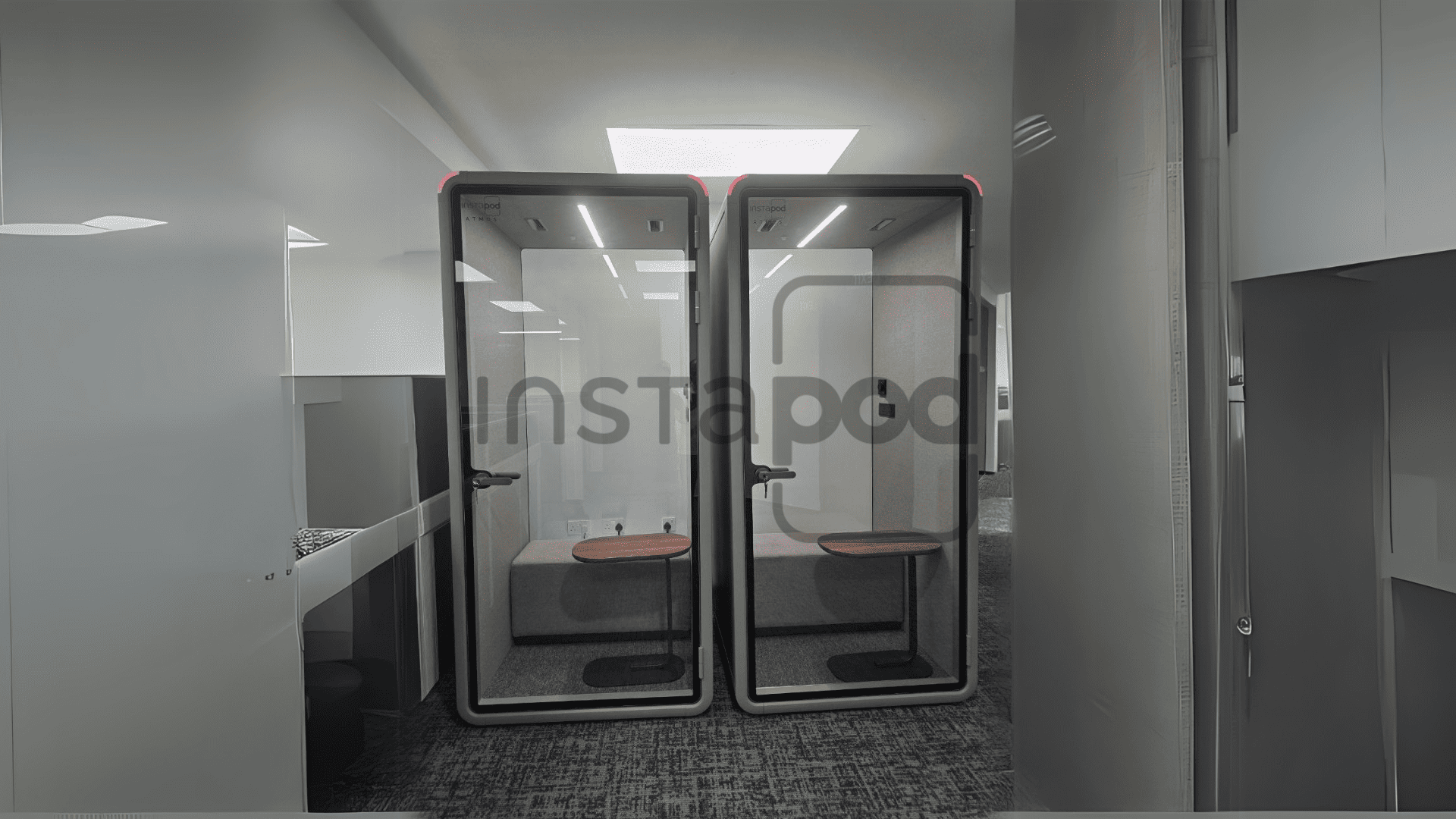
Modern tech workplaces are often vibrant but can become overwhelming when deep focus is required. By integrating purpose-built privacy solutions, teams manage their environment more effectively. This shift allows for a better balance between open-plan connectivity and the necessity of private, high-bandwidth communication.
Addressing the need for immediate, high-focus communication
Software development cycles demand constant shifting between collaborative discussion and deep, uninterrupted coding. When a sudden issue requires a quick engineering sync, having an accessible space becomes critical. These pods ensure that team members do not have to waste time finding an open room elsewhere in the building.
Minimizing the signal-to-noise ratio in open-plan offices
Open offices often struggle with ambient chatter that disrupts developers during complex tasks. Providing sound-managed environments helps maintain sharp focus on complex logic by isolating team members from office background noise. This creates a predictable auditory environment that helps maintain consistency throughout the day.
Facilitating ad-hoc brainstorming sessions between distributed teams
Global teams rely on constant video contact to stay aligned on product goals. Having a dedicated phone booth office means that ad-hoc calls can happen as soon as a challenge arises. This responsiveness is vital when maintaining velocity in fast-paced software projects.
Reducing the logistical friction of scheduling large conference rooms
Booking a large boardroom for a ten-minute technical sync is rarely efficient. By utilizing smaller, decentralized pods, teams avoid the frustration of empty conference rooms that are pre-booked. This simple change allows for higher utilization of all office resources.
Acoustic engineering for crystal-clear technical dialogue
Technical conversations require precision, especially when discussing sensitive architecture or debugging remote systems. Effective soundproofing goes beyond blocking out noise; it creates an environment where audio quality remains stable and reliable. Poor acoustics can introduce errors or misunderstandings in high-stakes discussions.
Why soundproofing matters when discussing high-stakes technical architecture
When architecture discussions touch upon complex components, background interference is more than an annoyance. High-quality acoustic barriers prevent sensitive details from leaking into communal areas. Ensuring that internal discussions remain private is essential for maintaining secure technical environments.
Balancing external noise cancellation with internal audio absorption
Engineering the interior of a pod requires careful material science to manage internal reflections. Professional-grade booths utilize advanced fabrics and paneling to ensure that voices remain natural and clear. The following table summarizes the key considerations for achieving high-fidelity sound management:
| Feature | Function | Technical Benefit |
|---|---|---|
| Soundproofing | External noise reduction | Reduced auditory fatigue |
| Absorption | Internal echo removal | Improved mic clarity |
| Air Ventilation | Thermal regulation | Longer, comfortable sessions |
By prioritizing these elements, teams can ensure that their technical dialogue remains accurate and frustration-free, regardless of the noise level in the primary workspace.
Eliminating echo and reverberation for team members on the other end
Clear communication requires that the remote participant hears nothing but the local speaker. Using specialized acoustic dampening within the booth ensures their voice travels cleanly without metallic echoes. This professional standard reflects a commitment to detail during technical reviews and project syncs.
Privacy implications for sensitive proprietary technical documentation
Discussions involving proprietary data must happen within secure acoustic boundaries. Protecting trade secrets while collaborating in a busy office is simplified by using properly rated enclosures. This approach provides teams with the confidence they need to hash out complex problems without fear of data exposure.
Integrating hardware for rapid tech demonstrations
Technical scoping meetings often move quickly because they rely on sharing screen data and hardware prototypes. When desks are pre-equipped with high-speed connectivity and power, the focus remains on the software rather than the logistics of getting cameras or chargers connected. A seamless desktop setup ensures that demonstration hardware works the first time it is plugged in.
Essential connectivity features for seamless screen sharing and data transfer
Reliable, high-speed data ports are the backbone of spontaneous collaboration. Teams require standard interfaces that prevent the need for endless adapter dongles and configuration checks. By removing these minor technical bottlenecks, a quick check-in can turn into a productive work session in seconds.
Power management requirements for multiple high-performance devices
Running multiple high-performance devices during a scoping workshop demands robust power infrastructure. A well-designed booth must offer dedicated outlets that handle high-draw hardware without slowing down. Ensuring that laptops and mobile test devices stay charged throughout long sessions is a fundamental need for technical teams.
Mounting solutions for secondary displays during scoping workshops
Having the right hardware support inside a pod makes a significant difference in how effectively a team can share information. When team members can hook up a monitor within minutes, the depth of collaboration changes entirely. Consider the following hardware requirements for a productive setup inside office phone booths:
- Sturdy VESA-compatible monitor mounts for easy display rotation
- Integrated high-wattage USB-C power delivery ports for rapid charging
- Strategically placed data hubs for connecting test hardware
- Concealed cable paths that keep desks clear of clutter
Maintaining these standards turns each booth into an extension of the developer’s main workstation, ensuring they have the tools necessary to solve technical problems on the fly.
Managing cable clutter to maintain a professional backdrop
Visual distractions can take away from a professional interaction during a remote demonstration. By designing furniture that naturally hides charging cables, the focus remains on the screen share and the team member speaking. This clean aesthetic promotes a sense of readiness and efficiency.
Optimizing the booth layout for efficient problem solving
Ergonomics and lighting significantly affect how long a team can effectively collaborate inside a compact space. Designing the interior of a booth requires thinking about the physical needs of the user during deep-dive sessions. When the physical setup feels natural, developers can spend more time thinking about code rather than adjusting their chairs.
Improving desk ergonomics for intense collaborative tasks
Long-duration scoping tasks require chairs and desk heights that support natural posture. Proper ergonomic design ensures that team members stay comfortable even during intense periods of debugging or architecture review. This focus on physical comfort reduces fatigue and keeps the team focused on the technical challenge at hand.
Selecting furniture configurations that support sketching and whiteboard usage
Many of the best ideas come from visual diagrams rather than just verbal descriptions. Providing a small, integrated whiteboard surface inside the booth allows designers and engineers to map out flows quickly. This allows the space to act as a secondary, private meeting room for complex whiteboard sessions.
Maintaining optimal air quality and lighting during long focus sessions
Standard air circulation and dimmable lighting are vital for maintaining mental clarity over long periods. As focus sessions extend, having a fresh supply of air ensures that the team remains alert. High-quality lighting also reduces eye strain, allowing for more productive outcomes during intensive afternoon coding sessions.
Designing for accessibility to ensure all team members can participate
Inclusive design means that every team member can access and use available pods with confidence. Wide doors, easy-to-reach interfaces, and clear floor layouts are non-negotiable requirements. When technology infrastructure is accessible, it empowers the entire team to maximize their collaborative potential.
Strategizing the placement of booth infrastructure
Where you place your office phone booth matters just as much as the booth itself. A well-positioned pod fits seamlessly into the flow of daily office activity, making it an easy choice for any team member who needs to step away. The goal is to maximize usage without causing congestion in high-traffic corridors.
Minimizing transition time for developers moving from communal workspaces
Placing booths near the areas where developers sit creates a low-barrier solution for urgent tasks. If a developer has to walk across the floor, they are more likely to stay at their desk and struggle through a distracting environment instead. A quick walk increases the likelihood that a team member will reach out for a necessary collaboration.
Clustering pods near engineering hubs to encourage organic synergy
Putting pods right where the engineering team works encourages a collaborative culture. When pods are visible and near the workspace, they become an extension of team meeting habits. This proximity helps turn planned meetings into productive, spontaneous touchpoints.
Balancing proximity to teams with the need for designated quiet zones
While accessibility is key, placing pods too close to active team clusters can create new noise issues. Managing the layout of the office ensures that phone booths act as buffers rather than sources of noise. Thoughtful floor planning is the secret to keeping private spaces separate from noisy open-plan zones.
Scaling booth capacity based on the frequency of scoping meetings
Every team has different requirements for time spent in focus pods. By observing how often meetings occur, managers can better decide how many booths to add and where to distribute them. This ensures that the booth capacity matches the actual needs of the project cycles.
Measuring the efficiency gains of dedicated focus pods
Quantifying the success of new office infrastructure helps justify the investment and improve future planning. Efficiency gains are often seen in the speed at which teams can pivot from solo work to collaborative problem-solving. This responsiveness is a key indicator of a healthy, high-functioning team.
Reducing meeting setup time and technical bottleneck delays
Before dedicated spaces existed, finding a room could take ten minutes of frantic hunting. Once pods are installed, that time drops to nearly zero. This shift from searching to working represents a direct positive impact on total productive hours every week.
Improving team velocity through specialized collaborative environments
Productivity gains extend to the speed of team decision-making. When technical hurdles are addressed in dedicated, quiet environments, decisions are made faster and with fewer interruptions. This consistency contributes to a significant increase in overall team velocity.
Quantifying the impact of environment quality on software project timelines
Good environment quality correlates with shorter project timelines as teams spend less time overcoming logistical delays. Tracking the reduction in missed communication confirms the value of investing in high-quality acoustic pods. When the environment supports the work, the timeline reflects that efficiency.
Conclusion
Adopting modern focus solutions like pods turns the office into a powerful tool for complex technical work. By investing in the right infrastructure, teams can balance the benefits of open collaboration with the necessity of deep focus, ultimately shortening project lifecycles and improving the day-to-day experience for every developer.
Frequently Asked Questions
Are phone booths in offices soundproof enough for secure technical discussions?
Most modern phone booths utilize acoustic materials specifically designed to contain sound and reduce noise leakage, providing a high level of privacy that is suitable for general high-stakes professional conversations.
Can I install an office phone booth in a small workspace, for example in a office phone booth singapore apartment?
Yes, many modular pod designs are built to fit into smaller, space-constrained offices, making them ideal for urban environments where floor space is at a premium and every square foot needs to be optimized.
Is an office phone booth difficult to set up in my existing office?
Most modular solutions are designed for quick and simple installation that can be completed in a few hours without the need for extensive construction or permanent structural modifications to your current office layout.
Could an office phone booth singapore based team benefit from the mobility of these units?
Mobility is often a key feature for teams in rapidly evolving workspaces, as modular booths can usually be repositioned quickly to adapt to changing office configurations or moves to new office locations.
Do booths come equipped with all the necessary hardware for screen sharing?
Many units are pre-integrated with convenient power management and connectivity options, though you should check the technical specifications of each individual booth model to ensure it meets your team’s specific hardware requirements.
How many people can typical office phone booths accommodate?
While most models are designed for solo users needing a private space, there are larger configurations available that can comfortably house two or more people for collaborative sessions and team meetings.
What are the main maintenance requirements for privacy pods?
Maintenance is generally minimal, focused mainly on ensuring consistent air quality through ventilation filter checks and preserving the condition of mechanical components like door hinges and integrated screen mounts.