No pods added to your quote request yet. Add some now for a free quote!
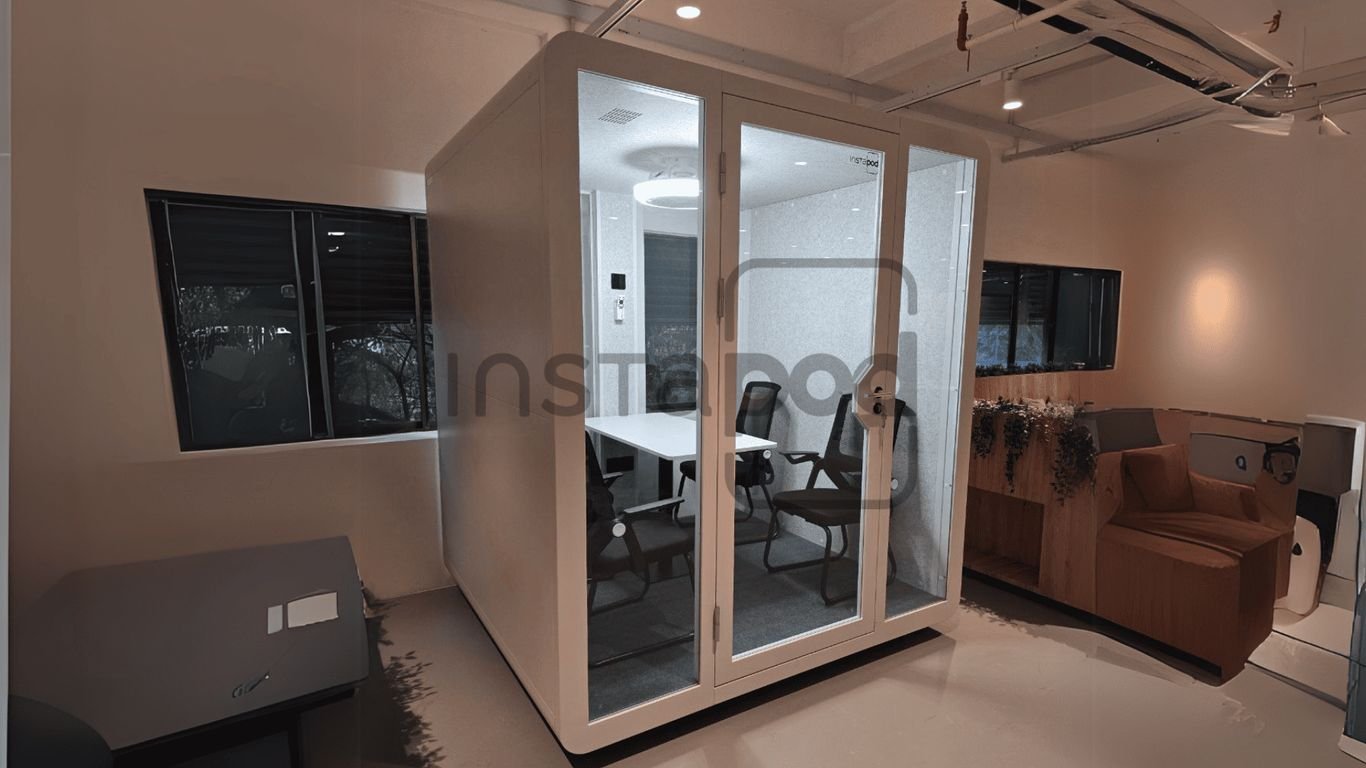
So, you’re thinking about getting some office privacy pods? They’re becoming super popular, and for good reason. In today’s work world, things are always changing, right? Whether you’re dealing with a busy open office or trying to make hybrid work actually work, these little rooms can make a big difference. They give people a quiet spot to focus or chat without bothering everyone else. Let’s break down how to get these set up so they actually help your team get more done.
Key Takeaways
- Figure out where your office privacy pods will go, how big they need to be, and make sure people can get around them easily.
- Pick materials that block sound so conversations and calls stay private and don’t disturb others.
- Make sure the pods have good lighting, fresh air, and the tech needed for calls and meetings.
- Match the look of the pods to your office’s style and add your company’s branding.
- Set up a system for booking the pods and keep them clean so they’re always ready to use.
Understanding the Role of Office Privacy Pods
So, you’re looking into office privacy pods. That’s a smart move, especially with how offices are changing these days. Think of these pods as little sanctuaries within your larger workspace. They’re not just fancy furniture; they serve some pretty important jobs.
Enhancing Focus in Open Workspaces
Open-plan offices are great for collaboration, right? Everyone’s out in the open, ideas can flow easily. But let’s be real, it can also be a constant buzz of distractions. Phone calls, chatter, keyboards clicking away – it all adds up. Privacy pods offer a much-needed escape hatch for deep work. They’re like a personal quiet zone where you can actually concentrate on that report or complex task without someone’s conversation drifting over. It’s about giving people the option to tune out the noise when they need to get serious work done.
Facilitating Confidential Conversations
Not everything can be discussed out in the open. Whether it’s a sensitive client call, a private HR discussion, or just a quick chat with a colleague that needs to stay between you two, privacy is key. Pods provide that secure, enclosed space. You don’t have to worry about eavesdroppers or accidentally sharing information you shouldn’t. It’s a simple way to maintain professionalism and trust within the workplace.
Supporting Hybrid Work Models
Hybrid work is here to stay, and it brings its own set of challenges. When people are in the office only a few days a week, they need those days to be productive. Pods are perfect for this. They offer a dedicated spot for focused work or impromptu meetings when someone is on-site, without needing to book a formal conference room for a quick call. They help make the office a place for specific, valuable interactions rather than just a place to sit.
Here’s a quick look at why they’re becoming so popular:
- Increased Productivity: Less distraction means more getting done.
- Improved Employee Well-being: A quiet space can reduce stress.
- Better Collaboration: Dedicated meeting spots without disrupting others.
These pods aren’t just about blocking out noise; they’re about creating intentional spaces for different kinds of work. They acknowledge that not all tasks are suited for an open environment and provide a flexible solution.
Strategic Placement of Office Privacy Pods
So, you’ve decided to bring in some office privacy pods, maybe some phone pod units or even larger conference room pods. That’s a smart move for a more flexible workspace. But where you put them really matters. It’s not just about finding an empty corner; it’s about making them work for your office, not against it.
Assessing Space Requirements and Footprint
First off, let’s talk size. You need to know how much room these soundproof office pods actually need. Don’t just guess. Measure the dimensions of the pods you’re considering. Then, add some breathing room around them. People need to get in and out easily, and you don’t want them feeling like they’re crammed into a closet. Think about the door swing, too – will it hit a desk or a wall? It’s always better to have a little too much space than not enough. A quick table can help visualize this:
| Pod Type | Typical Footprint (Approx.) | Recommended Clearance |
|---|---|---|
| Single Phone Pod | 3′ x 3′ | 4′ radius |
| Small Meeting Pod | 6′ x 6′ | 5′ radius |
| Large Conference Pod | 8′ x 10′ | 6′ radius |
Mapping Essential Traffic Flow
Next, consider how people actually move around your office. You don’t want your new office booth blocking a main hallway or creating a traffic jam. Think about where people naturally walk – to the coffee machine, to the restrooms, to meeting areas. Place your pods in spots that are easy to find but don’t interrupt these natural paths. A pod tucked away in a quiet zone is great, but if it’s hard to get to, people won’t use it. It’s about finding that sweet spot between accessibility and peace.
Placing pods thoughtfully can actually improve how your office feels and functions. It’s about creating zones for different types of work without making the whole space feel cluttered or difficult to navigate.
Considering Accessibility and ADA Compliance
This is a big one. You’ve got to make sure everyone can use these pods. That means checking door widths, making sure there’s enough space for a wheelchair to turn around inside (if applicable), and looking at any thresholds. Some pods are designed with ADA compliance in mind, which is fantastic. If you’re looking at standard models, double-check the specs or talk to the manufacturer about modifications. It’s not just good practice; it’s often the law.
Here are a few things to check:
- Door Width: Can a standard wheelchair fit through?
- Interior Space: Is there enough room to maneuver inside?
- Thresholds: Are they low enough to avoid tripping or being a barrier?
- Reach: Can controls like light switches or power outlets be reached from a seated position?
Getting the placement right from the start saves a lot of headaches down the line. It makes your investment in these privacy solutions truly pay off.
Designing for Optimal Comfort and Functionality
When setting up privacy pods, comfort and how well they work are just as important as how they look. If people aren’t comfortable, they won’t want to use them, no matter how fancy they are. It’s about making a space where folks can actually get things done without feeling cramped or distracted.
Prioritizing Ergonomics and Interior Comfort
Think about the furniture. You want chairs that support people properly, especially if they’ll be sitting for a while. Adjustable chairs are a good idea, letting people find their own sweet spot. Also, consider different seating types – maybe a mix of standard chairs, some higher stools, or even a comfy bench. It caters to different work styles and preferences. The goal is to make the inside feel welcoming and supportive, not like a temporary holding cell.
Integrating Essential Technology and Connectivity
Nobody wants to deal with tangled cords or dead batteries when they’re trying to focus or have a call. Make sure the pods have easy access to power outlets and USB ports. Built-in charging stations are a big plus. If these pods are meant for meetings or video calls, think about integrating screens or simple audio setups. This cuts down on setup time and frustration, letting people get straight to work.
| Feature | Benefit |
|---|---|
| Power Outlets & USB | Keep devices charged and ready to go. |
| Integrated Screens | Streamline presentations and video calls. |
| Wi-Fi Connectivity | Reliable internet access for all tasks. |
| Adjustable Lighting | Reduce eye strain and set the right mood. |
Ensuring Adequate Lighting and Ventilation
Bad lighting and stale air can really mess with concentration. If possible, position pods where they can get some natural light. If not, use good artificial lighting. Avoid a single, harsh overhead light. Instead, think about layered lighting: some general light, and maybe a focused task light. Adjustable LEDs are great because people can change the brightness or even the warmth of the light to suit their needs. And please, make sure there’s good airflow. Stuffy pods are a productivity killer. Simple vents connected to the building’s system or a small, quiet fan can make a huge difference in keeping the air fresh and the occupants alert.
A well-designed pod isn’t just a box; it’s a functional space that supports well-being and productivity. Paying attention to the small details like comfortable seating, easy tech access, and good air quality makes a big difference in how much people actually use and benefit from these areas.
Achieving Superior Acoustic Performance
Okay, so we’ve talked about placing and designing these pods, but let’s get real about noise. Open offices are loud. It’s just how it is. If you’re putting a privacy pod in the middle of all that, it needs to actually be private. That means soundproofing. It’s not just a nice-to-have; it’s pretty much the whole point.
Selecting Sound-Absorbing Materials
This is where the magic happens, or doesn’t, if you pick the wrong stuff. You can’t just use regular wall panels and expect silence. Think about what you see in recording studios or those fancy quiet rooms. You need materials designed to soak up sound waves, not just block them a little.
- Acoustic Panels: These are often fabric-covered boards. They come in tons of colors and patterns, so you can actually make them look good. They’re great for walls and ceilings.
- Foam: You know that wedge-shaped foam? It works. It might not be the prettiest thing to look at, but it does a solid job of absorbing sound. You can get it in sheets or tiles.
- Heavy Fabrics: Think thick curtains or even heavy blankets. If your pod has windows, these can help a lot. Just make sure they’re dense.
When you’re looking at materials, keep an eye out for the Noise Reduction Coefficient (NRC). This number tells you how well a material absorbs sound. Higher NRC means better absorption. Aim for materials with an NRC of 0.70 or higher for good results.
Evaluating Decibel Reduction Ratings
Materials are one thing, but how much actual noise reduction do you get? That’s where decibel (dB) ratings come in. Different pods will advertise their sound isolation capabilities. This is usually measured as an STC (Sound Transmission Class) rating, which indicates how well the pod blocks airborne sound. A higher STC rating means better sound blocking.
| Component | Typical STC Rating | Notes |
|---|---|---|
| Standard Wall | 30-35 | Basic sound blocking |
| Good Pod Wall | 35-40 | Noticeable improvement |
| High-Performance | 40+ | Significant sound isolation, near silence |
It’s not just about the walls, though. The doors, windows (if any), and how everything is sealed up makes a big difference. A pod might have great wall materials, but if the door has a big gap, you’re out of luck.
Sealing Doors and Edges Effectively
This is often the weakest link. You can have the best sound-absorbing materials inside, but if sound can sneak in or out through gaps, it’s all for nothing. Think about it like a house – drafts come in through cracks, and sound is kind of the same.
- Door Seals: Look for pods with good quality gaskets or seals around the door frame. These compress when the door closes, creating a tight barrier.
- Thresholds: A solid threshold at the bottom of the door prevents sound from traveling underneath.
- Edge Sealing: Make sure all the panels and joints are properly sealed. Sometimes, a simple bead of acoustic caulk can make a surprising difference.
You want to create a solid barrier. This means paying attention to every seam, every edge, and especially the door. It’s the little details that stop sound from leaking out and ruining the quiet.
So, when you’re checking out pods, don’t just look at the pretty pictures. Ask about the materials, check the STC ratings, and really inspect how the doors and edges are put together. Your team’s focus will thank you for it.
Customizing Office Privacy Pods for Your Brand
Aligning Finishes with Office Aesthetics
When you’re picking out privacy pods, think about how they’ll look with the rest of your office. You don’t want them to stick out like a sore thumb, right? Most pod manufacturers let you choose from a bunch of different materials and colors for the outside and inside. It’s a good idea to look at your current office decor – the carpets, the wall colors, even the furniture – and pick pod finishes that blend in nicely. This makes the whole space feel more put together and less like you just dropped in a bunch of random boxes. It’s all about making the pods feel like a natural part of your workspace, not an afterthought.
Incorporating Company Branding Elements
This is where you can really make the pods your own and show off your company’s identity. Many pods come with options for custom decals or graphics. You could put your company logo on the outside, or maybe a cool design that matches your brand’s vibe. Some companies even use this space to share their mission statement or core values. It’s a subtle way to reinforce your brand and make employees feel a stronger connection to the company. Plus, it just looks professional when visitors come in.
Choosing Furniture for Versatile Use
Think about what people will actually be doing inside the pods. Are they just for quick phone calls, or will people be having longer meetings or doing focused work? If it’s the latter, you’ll want to make sure the furniture inside is comfortable for extended periods. This might mean looking for pods that can fit a small desk and a good chair. Some pods even have options for built-in seating or small tables. It’s worth considering if you need different types of pods for different uses – maybe some are just for calls, and others are set up for more in-depth work or small team huddles. Getting the furniture right means the pods will actually get used for what you intended them for.
Maintaining and Managing Your Pods
So, you’ve got these great privacy pods set up, and people are actually using them. That’s awesome! But now comes the part that keeps them awesome: keeping them clean and running smoothly. It’s not just about setting them up and forgetting about them; a little ongoing attention goes a long way.
Implementing Booking and Access Systems
To make sure everyone gets a fair shot at using a pod and to avoid those awkward "who booked this?" moments, a booking system is a must. Think simple digital calendars or dedicated apps. This helps cut down on no-shows and makes it easy for people to find an available pod when they need one. For access, you could go with key cards, a simple app, or even just a code that changes regularly. It adds a layer of security and control.
- Track usage patterns: See which pods are most popular and when.
- Reduce no-shows: Automated reminders can help.
- Manage access: Control who can book and when.
Keeping track of who’s using which pod and when is key to making sure they’re utilized effectively. It also helps prevent double bookings and ensures that everyone has a chance to use these valuable quiet spaces.
Establishing Regular Cleaning Protocols
Let’s be real, shared spaces can get a bit grubby if you’re not careful. A consistent cleaning routine is super important. You don’t want your pods turning into germ magnets.
Here’s a basic rundown:
- Daily quick clean: Wipe down surfaces like tables, door handles, and any tech interfaces. A quick spray and wipe with disinfectant is usually enough.
- Weekly deeper clean: Give the whole pod a more thorough going-over. Vacuum the floor, clean any glass, and check the corners.
- Monthly check-up: This is when you look for any signs of wear and tear, check that the lights and ventilation are working, and make sure all the tech is still in good shape.
Planning for Future Needs and Expansion
If your privacy pods are a hit (and they should be!), you might find yourself needing more. That’s a good problem to have! But adding more isn’t just about buying another pod. You need to think about where it will go, how it will fit with the existing layout, and if your building’s power and internet can handle it. It’s smart to have a plan for how you might add more pods down the line without causing a headache for yourself or your team. Consider:
- Available space: Do you have room for more pods without making the office feel cramped?
- Infrastructure: Can your current power and network support additional pods?
- Budget: What’s the financial plan for adding more units?
Thinking ahead about expansion now can save a lot of hassle later.
Wrapping It Up
So, getting these office pods set up might seem like a lot at first. You’ve got to think about where they’ll go, how quiet they need to be, and if the lighting is right. Making sure they have good internet and decent mics is key too, so calls don’t sound like they’re coming from underwater. Adding a few extra power outlets doesn’t hurt, and maybe even wheels if you think you’ll need to shuffle them around later. Before you know it, you’ll have these little quiet spots where people can actually get things done without the usual office noise. It might feel a bit strange at first, but soon enough, everyone will wonder how they managed without them. Give them a try, make a few adjustments, and watch your team’s meetings go from a mess to something smooth.
Frequently Asked Questions
What exactly is an office privacy pod and why would my company need one?
An office privacy pod is like a mini, quiet room built inside a bigger office. It’s a special spot where people can go to talk on the phone, have a video meeting, or just work without all the noise and interruptions from an open office. Think of it as a personal bubble for getting stuff done or having important chats.
How do I pick the best spot in the office for these pods?
First, measure the space to make sure the pod will fit nicely. It’s also super important to think about how people walk around your office. You don’t want the pods blocking busy paths or making it hard to get to places like the printer or the break room. Try to put them in spots that are easy to get to but don’t get in the way of daily office movement.
What kind of stuff should I put inside a pod to make it work well?
You’ll want things like a good screen for video calls, a clear microphone, and a speaker so everyone can hear and be heard. Also, make sure there are plenty of outlets to charge devices and strong Wi-Fi so calls don’t get cut off. Comfortable seating is a must too!
How can my team know which pods are free and book them?
The easiest way is to use a simple online sign-up system. People can see which pods are open and reserve them for a specific time. You can also set up a way to unlock the doors, like using a special card or a code on a phone app, so only the person who booked it can get in.
What materials are best for making sure the pods are quiet?
To keep sound from getting in or out, you need materials that soak up noise. Things like soft foam panels on the walls and ceiling work great. Thick carpets or rugs on the floor also help a lot. And make sure the door seals up tight so no sound can sneak through the edges.
How do I keep the pods clean and make sure they’re always ready to use?
It’s a good idea to wipe down the surfaces every day. Clean the screens and windows once a week. Also, check that all the lights, cables, and tech gear are working properly. If anything breaks, fix it right away. If your team starts using them a lot, you might need to think about getting more pods later on.