No pods added to your quote request yet. Add some now for a free quote!
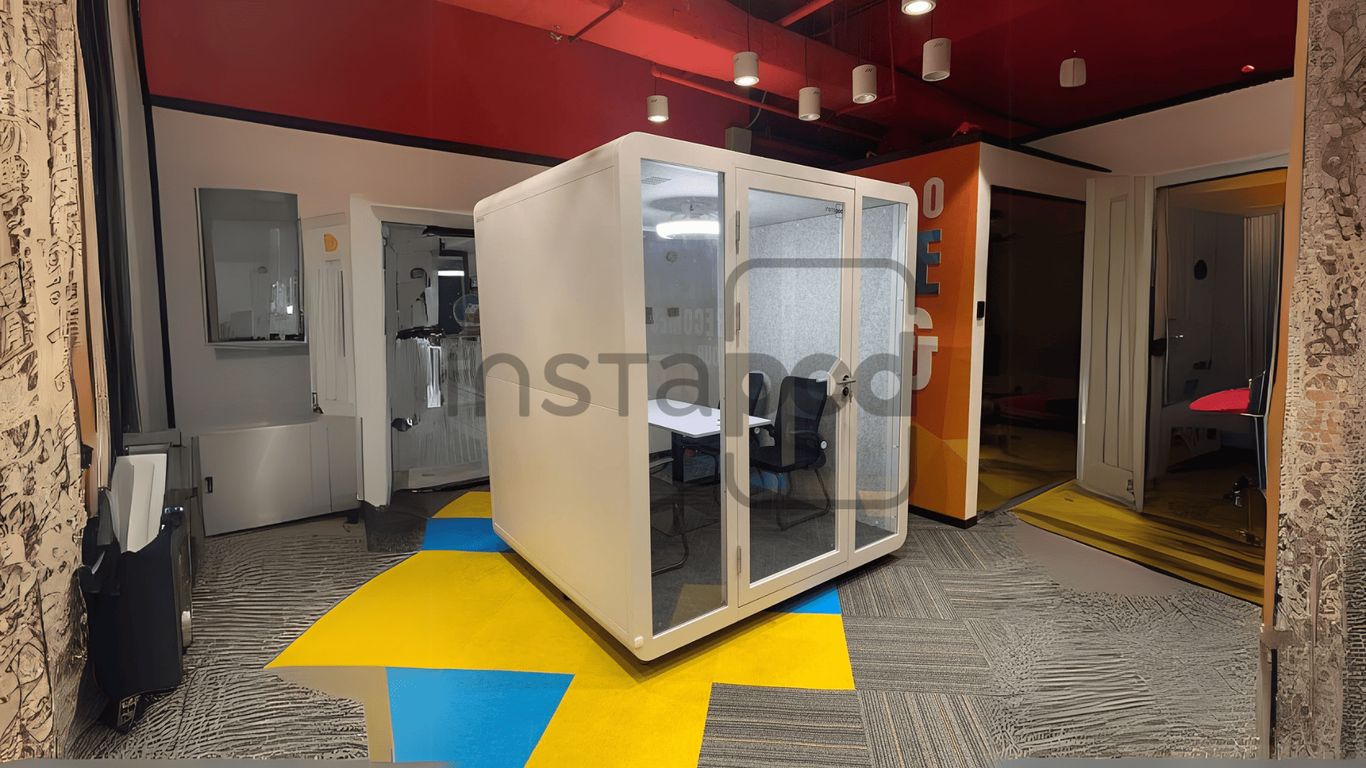
So, you’re thinking about getting some meeting room pods for your office? Smart move. These little rooms are popping up everywhere, and for good reason. They help make better use of your space, cut down on noise, and just make it easier for people to get work done without a million distractions. Whether you’re in a huge open-plan office or just trying to make the most of what you’ve got, these pods can really change things up. Let’s talk about how to get them set up right so everyone can actually use them and get more done.
Key Takeaways
- Meeting room pods turn unused office spots into useful work areas, giving you more places for meetings without building walls.
- These pods are built to keep sound out and in, so you can have private chats or focus without bothering others.
- You can equip meeting room pods with tech like power, USB ports, and video gear to make collaboration simple.
- Picking the right meeting room pods means looking at your space, what you need them for, and what your budget allows.
- Putting meeting room pods in the right spots and showing your team how to use them makes a big difference in how well they work.
Maximizing Office Space with Meeting Room Pods
Transforming Underutilized Areas into Functional Zones
Open-plan offices are great for collaboration, but sometimes you just need a quiet spot. That’s where meeting room pods come in. They’re like little private rooms that you can pop into any corner of your office. Think about those awkward, empty spaces or the ends of hallways – these pods can turn them into useful meeting spots. This means you get more places to meet without having to build walls or do major renovations. It’s a smart way to use the space you already have.
Increasing Meeting Capacity Without Permanent Construction
Adding more meeting rooms the old way means construction, permits, and a lot of disruption. Meeting pods offer a much simpler solution. They’re pre-built and can be set up pretty quickly. This is a big win if your team is growing or if you just need more places for quick chats or video calls. You can add a few office phone booths here and there, or a couple of larger acoustic office pods, and suddenly you have way more meeting capacity. It’s flexible, too; if your office layout changes, you can often move the pods.
Enhancing Office Aesthetics with Contemporary Designs
Let’s be honest, a lot of office furniture can be pretty bland. Meeting room pods, though, often come in sleek, modern designs. They can actually make your office look better. Many come in different colors and finishes, so you can pick ones that match your company’s style. They add a touch of professionalism and can make your workspace feel more put-together. It’s not just about function; it’s about making the office a nicer place to be.
Ensuring Privacy and Acoustics in Meeting Room Pods
In today’s busy offices, finding a quiet spot for a sensitive chat or a focused work session can feel like a treasure hunt. That’s where meeting room pods, sometimes called privacy pods or privacy booths, really shine. They’re designed specifically to give you that much-needed bubble of quiet in an otherwise open environment.
Creating Quiet Spaces for Focused Work
Open-plan offices are great for collaboration, but they aren’t always ideal when you need to concentrate. These pods act as personal sanctuaries. They use special materials and construction to block out the general office hum, letting you get into your flow without constant interruptions. Think of it as your own mini-office, ready when you need it.
Minimizing Distractions for Sensitive Conversations
Let’s be honest, not every conversation is meant for the whole office to hear. Whether it’s a performance review, a client call, or just a confidential team discussion, privacy pods offer a secure space. The enclosed design and sound-dampening features mean your conversation stays within the pod, giving you peace of mind.
Achieving Optimal Sound Reduction for Confidentiality
When we talk about sound reduction, it’s not just about making things quieter; it’s about creating a controlled environment. High-quality privacy booths are built with acoustic principles in mind. They often achieve sound reduction ratings that mean you can discuss sensitive information without worrying about it drifting into the main workspace. This is key for maintaining trust and professionalism.
Here’s a quick look at what makes them effective:
- Enclosed Structure: A solid, sealed design is the first line of defense against noise.
- Sound-Dampening Materials: Walls, ceilings, and floors are often made with materials that absorb sound rather than reflect it.
- Acoustic Seals: Doors and windows are fitted with seals to prevent sound leakage.
The goal is to create a space where the outside world fades away, allowing for clear communication and deep concentration. It’s about giving people the control to choose their environment based on the task at hand.
These privacy pods are a smart addition for any office looking to balance open collaboration with the need for focused, private work.
Equipping Meeting Room Pods for Seamless Collaboration
Meeting pods aren’t just empty boxes; they’re designed to be functional hubs for getting work done. To make sure your pods really help your team collaborate without a hitch, you need to think about the tech and features inside. It’s about making it easy for people to jump in, connect, and be productive, whether they’re in the office or joining from somewhere else.
Integrating Power and USB Charging Solutions
This is pretty basic, but super important. People need to charge their laptops and phones. Having power outlets and USB ports readily available inside the pod means no one has to hunt for an outlet or worry about their battery dying mid-meeting. Most modern pods come with these built-in, often with a mix of standard outlets and USB-A and USB-C ports. It’s a small detail that makes a big difference in keeping things running smoothly.
Implementing Built-in Video Conferencing Systems
For hybrid teams, a good video conferencing setup is non-negotiable. Many pods can be outfitted with integrated cameras, microphones, and speakers. This means you don’t have to mess with setting up your own equipment every time. Just walk in, connect your laptop, and you’re ready for your virtual meeting. Some systems even have smart features like automatic camera tracking or noise cancellation, which really helps make remote participants feel like they’re right there in the room.
Utilizing Smart Lighting and Ventilation Features
Comfort plays a big role in how productive people are. Pods should have good lighting that’s not too harsh and can be adjusted if needed. Also, proper ventilation is key; nobody wants to feel stuffy or drowsy in a small space. Smart systems can control both lighting and air quality, sometimes even automatically based on occupancy. This keeps the environment pleasant and conducive to focused work or discussion for as long as needed.
Think about the user experience from the moment someone walks into the pod. Is it easy to connect? Is it comfortable? Does the technology just work? These are the questions that separate a good pod setup from a great one.
Selecting the Right Meeting Room Pods for Your Needs
So, you’ve decided meeting pods are the way to go. Awesome! But now comes the fun part: picking the right ones. It’s not just about grabbing the first shiny pod you see. You’ve got to think about what your team actually needs and what your office can handle. It’s a bit like choosing a new couch – you wouldn’t just buy one without measuring your living room, right?
Assessing Available Space and Team Requirements
First things first, take a good look at your office. Where could a pod actually fit? Are we talking about that awkward corner by the coffee machine, or maybe a section of a larger open area? Measure everything out. Then, think about your people. How many folks usually need to meet at once? Are these quick chats, or do people need to settle in for a longer session? Some pods are built for two, others can squeeze in six or more. It’s also worth asking around – what do people wish they had for meetings? More quiet spots? A place for video calls without background noise? Getting this info upfront stops you from buying a pod that’s too big, too small, or just not right for the job.
Determining Budget and Feature Priorities
Okay, let’s talk money. Meeting pods can range quite a bit in price. You can find simpler, more basic models, or go all out with fancy tech and top-notch soundproofing. It’s a good idea to set a budget early on. Think about what features are non-negotiable. Is amazing sound insulation a must-have for confidential chats? Do you absolutely need built-in screens for presentations? Or is a simple, quiet space enough? Sometimes, looking at pre-owned pods can be a smart way to save some cash while still getting a quality product. It’s all about balancing what you want with what you can afford.
| Pod Type | Typical Price Range (USD) | Key Features to Consider |
|---|---|---|
| Small Huddle Pod | $7,000 – $15,000 | Compact size, basic soundproofing, power outlet |
| Medium Meeting Pod | $15,000 – $25,000 | Accommodates 4-6 people, better acoustics, ventilation |
| Large Collaboration Pod | $25,000+ | Ample space, advanced AV, premium soundproofing, lighting |
Evaluating Design, Mobility, and Sustainability
Beyond the practical stuff, don’t forget about how the pod looks and how it fits into your office’s vibe. Do you want something sleek and modern, or more classic? Many companies let you pick finishes and colors, so you can match your office decor. Also, consider if you might need to move the pod later on. Some are designed to be easily disassembled and reassembled, which is handy if your office layout changes often. And if your company is big on being green, look for pods made with recycled materials or those designed for easy end-of-life recycling. It’s a nice bonus that shows you care about the planet.
Choosing the right pod isn’t just about ticking boxes; it’s about creating a space that genuinely helps your team work better. Think about the long game – how will this pod support your company’s goals and your employees’ daily work life?
Integrating Meeting Room Pods into Your Workspace
So, you’ve picked out some cool meeting pods. Awesome! But just plopping them down anywhere isn’t going to cut it. You need a plan. Think of it like setting up a new piece of furniture – you wouldn’t just shove it in a corner and hope for the best, right? It’s about making them work with your office, not just in it.
Planning Strategic Placement for Optimal Flow
Where you put these pods really matters. You don’t want them blocking main walkways or ending up in super noisy spots. The goal is to tuck them into areas that might be a bit awkward or underused. Think about those dead corners or wide-open spaces that just feel empty. Pods can fill those gaps nicely. Also, consider how people will actually use them. If they’re for quick chats, maybe put them closer to team desks. If they’re for more serious calls, a slightly quieter spot might be better. It’s all about making them accessible without being disruptive.
- Identify underutilized zones: Look for corners, wide hallways, or open areas that aren’t serving much purpose.
- Consider traffic flow: Place pods where they won’t create bottlenecks or obstruct movement.
- Match location to purpose: Put quick-chat pods near work areas and private call pods in calmer zones.
- Group similar pods: If you have several pods for similar uses, clustering them can create a dedicated
Enhancing Productivity and Collaboration with Meeting Room Pods
Meeting room pods aren’t just about adding more places to sit; they’re about creating the right kind of space for different work needs. Think about it – sometimes you just need a quiet corner to really get into a task without the office buzz. Other times, you need a small, focused spot to hash out an idea with a couple of colleagues. Pods make these specific scenarios actually happen.
Supporting Focused Work Sessions and Brainstorming
These pods are fantastic for when you need to really concentrate. They offer a break from the open office, giving you a private zone to dive deep into a project or have a serious brainstorming session. The enclosed nature means fewer interruptions, and the built-in features like good lighting and ventilation help keep you comfortable and sharp for longer.
- Individual Focus: Perfect for tasks requiring deep concentration, like writing reports or coding.
- Small Group Ideation: Ideal for teams of 2-4 to bounce ideas around without disturbing others.
- Reduced Distractions: Sound dampening helps keep external noise out and internal discussions contained.
The ability to step away from the main work area into a dedicated, quiet space can significantly boost concentration and the quality of output for tasks that demand it.
Facilitating Small Group Discussions and Decision-Making
Forget trying to cram into a corner or book a large conference room for a quick chat. Pods are designed for these in-between moments. They make it easy for small teams to gather, discuss, and make decisions quickly. This speeds things up and keeps momentum going, which is a big win for getting things done.
| Activity Type | Typical Pod Size | Benefit |
|---|---|---|
| Quick Huddle | 2-3 people | Immediate availability, no booking needed |
| Project Check-in | 3-4 people | Private discussion, focused agenda |
| Client Call (Internal) | 1-2 people | Confidentiality, professional setting |
Empowering Employees to Choose Ideal Work Environments
Giving people the choice of where they work is a game-changer. When employees can select a space that fits their current task – whether it’s a quiet pod for solo work or a small, enclosed space for a team discussion – they tend to be more productive and happier. It’s about trusting your team to know what they need to do their best work, and providing them with the tools, like these pods, to make it happen.
Wrapping Up Your Pod Setup
So, getting meeting pods into your office is really about making things work better for everyone. They’re not just fancy boxes; they’re tools that help people focus, talk things through without bothering others, and just generally get more done. Whether you’re dealing with a hybrid setup or just trying to make better use of your space, these pods can really make a difference. Think about what your team needs, pick the right pods, and get them set up. It’s a pretty straightforward way to boost productivity and make your office a more pleasant place to be.
Frequently Asked Questions
What exactly are meeting room pods?
Think of meeting pods as small, private rooms you can put almost anywhere in your office. They’re like mini-meeting spaces that are separate from the main work area. They’re great for when you need to have a quiet chat, make a phone call, or work with a small group without bothering anyone else. Some are big enough for a few people, while others are just for one person.
Why are these pods becoming so popular?
Offices are changing, and many are now open spaces. This is great for talking to people, but not so great for quiet work or private talks. Pods give you that private space back without having to build walls. Plus, they help cut down on noise, so everyone can focus better. They’re also easy to move if you need to change your office layout later.
Can I hear people talking inside the pods, or can people outside hear me?
Good meeting pods are built to be soundproof. They use special materials in the walls and doors to block out noise. This means you can have a private conversation or a video call without worrying about others hearing you, and you won’t be disturbed by the noise from the rest of the office.
What kind of technology usually comes with these pods?
Many pods come ready for modern work. You’ll often find power outlets and USB ports to charge your devices. Some even have built-in screens for video calls, speakers, and microphones, making it super easy to connect with people who aren’t in the office. They also usually have their own lights and fans to keep things comfy.
How do I decide which pod is best for my office?
First, think about how many people will use the pod and what they’ll do in it. Do you need space for two people for quick chats, or four people for a small meeting? Also, consider where you’ll put it – do you need something small that can fit in a corner, or something bigger? It’s also smart to think about how it looks and if you might need to move it later.
Do I need to hire someone to install these pods?
Usually, yes. While pods are designed to be put together easily, professional installation is often recommended. This makes sure they are set up correctly, safely, and can be placed in the best spot for your office’s flow. Many companies that sell pods also offer installation services.