No pods added to your quote request yet. Add some now for a free quote!
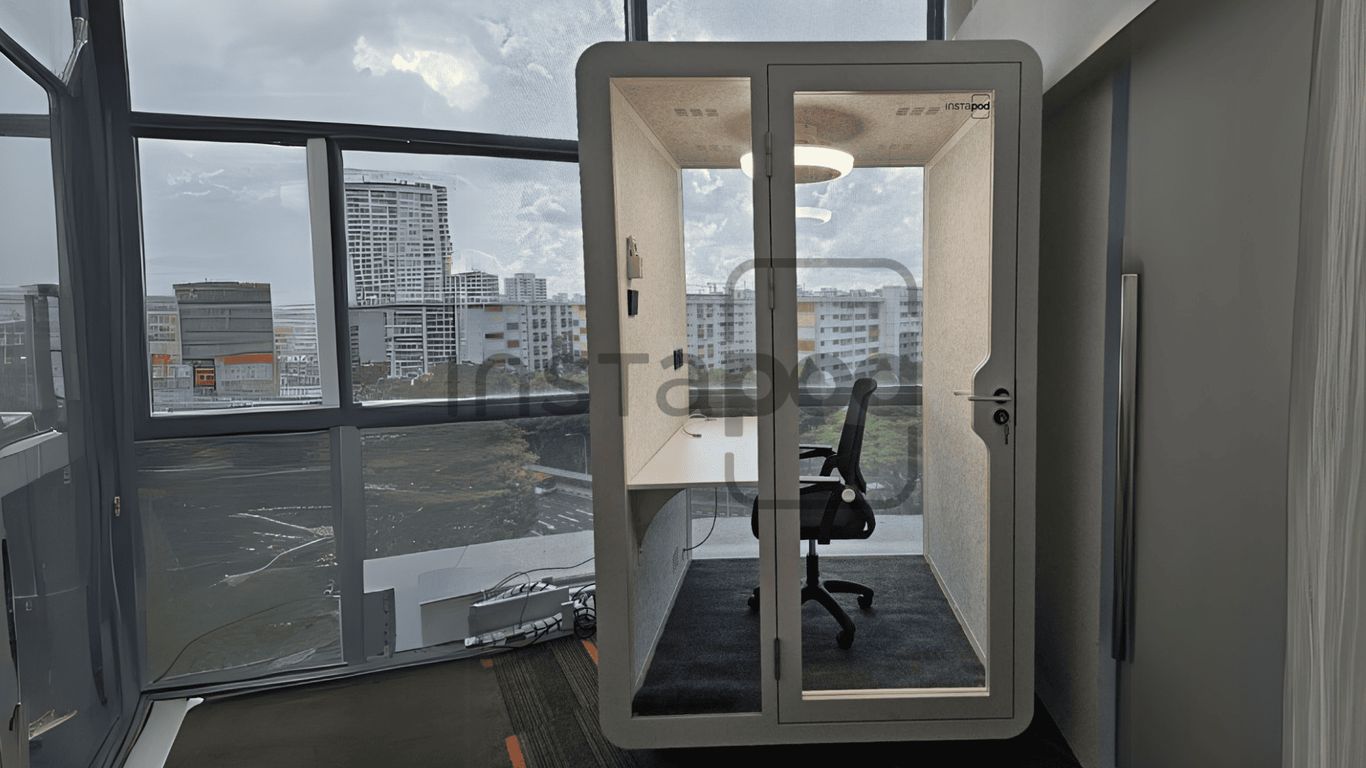
In today’s workplaces, especially in busy Singapore, finding a quiet spot to focus or have a private chat can feel impossible. Open-plan offices, while great for some things, often mean constant noise and distractions. But there’s a simple solution that’s changing how we work: office pods. These little spaces are popping up everywhere, and for good reason. They offer a way to get work done without the usual office chaos. Let’s look at how an office pod can really make a difference in your day.
Key Takeaways
- Office pods help solve the noise and distraction problems common in open-plan offices, giving workers quiet spaces.
- These pods are versatile, working as private call booths, collaborative meeting spots, or areas for focused individual work.
- Beyond meetings, pods can be used for video calls, quick rehearsals, or even quiet breaks to de-stress.
- When setting up pods, think about where to put them, how to keep them comfortable, and making sure the tech works from day one.
- Measuring how much pods are used and getting feedback from staff helps you make sure your investment is paying off and adjust as needed.
Transforming Workspaces with Office Pods in Singapore
Open-plan offices have been the rage for a while, promising collaboration and a buzzing atmosphere. But let’s be real, they often come with a side of constant noise and a serious lack of private space. That’s where office pods, or work booths as some call them, step in. They’re not just fancy dividers; they’re becoming a pretty big deal in Singapore’s workplaces, helping to fix some of those open-plan headaches.
Addressing Open-Plan Office Challenges
It turns out, not everyone thrives on constant chatter. Many people need quiet to really get their work done, or a private spot for a sensitive call. Open offices can make these simple needs feel like a luxury. This is why the idea of dedicated, enclosed spaces like work pods has really taken off. They offer a way to get that much-needed privacy without completely overhauling the office layout.
The Rise of Modular Meeting Pods
These aren’t your grandma’s cubicles. Modern meeting pods are often modular, meaning they can be moved, reconfigured, or even expanded. This flexibility is a huge plus for businesses that might not know what their space needs will be next year. They’re designed to be quick to install and can fit into various spots, from quiet corners to central collaboration zones. Think of them as adaptable building blocks for your office.
Key Features of Modern Office Pods
What makes a good office pod? Well, it’s more than just four walls. Good ones come with decent ventilation to stop them from getting stuffy, and they’re built with soundproofing in mind so you can actually have a private conversation or focus without the office noise bleeding in. Many also include power outlets and USB ports, because nobody wants to be hunting for a plug. Some even have smart features like occupancy sensors or integrated screens.
Here’s a quick look at what to expect:
- Acoustic Performance: Designed to significantly reduce noise transfer.
- Ventilation: Built-in fans to keep the air fresh.
- Connectivity: Integrated power outlets and USB ports.
- Comfortable Furnishings: Ergonomic seating and adequate lighting.
- Optional Tech: Screens, whiteboards, or booking systems.
Maximizing Productivity and Focus with Pod Solutions
Open-plan offices are great for some things, but let’s be honest, they can be a total distraction zone. Constant chatter, ringing phones, and people walking by – it’s tough to get anything done. That’s where office pods really shine. They’re not just extra rooms; they’re designed to give people the specific spaces they need to do their best work, whether that’s a quick chat or some serious deep thinking.
Pods for Collaborative Sessions
Need to hash out a project with a few colleagues? Forget trying to find an empty conference room that might be booked in five minutes. These pods are like mini-meeting hubs. They’re built to comfortably fit a small group, usually between two and six people. Inside, you’ll often find everything you need: a small table, comfortable seating, power outlets for laptops, and sometimes even a screen for quick presentations. The key here is that they’re sound-insulated, meaning your brainstorming session won’t spill out and bother everyone else, and you won’t be constantly interrupted by office noise. It’s about giving teams a dedicated spot to connect and create without the usual open-office chaos.
Call Pods for Private Conversations
We’ve all been there, trying to take an important phone call or a sensitive video meeting while trying to whisper and hoping no one overhears. Call pods, often called phone booths, are the answer. These are compact, enclosed spaces designed specifically for one or two people. They offer a quiet sanctuary, blocking out office noise so you can speak clearly and privately. Think of them as your personal soundproof bubble for any conversation that requires discretion or just a moment of quiet. They’re perfect for sales calls, one-on-one check-ins, or any time you need to focus on a conversation without distractions.
Focus Pods for Individual Deep Work
Sometimes, the best way to get work done is to be completely alone with your thoughts. Focus pods are designed for just that. These are single-occupancy spaces built for solo concentration. Whether you’re writing a report, analyzing data, or just need to get into a flow state, these pods offer a quiet, distraction-free environment. They’re like a personal retreat within the office, allowing you to shut out the world and concentrate on the task at hand. Having these dedicated spaces signals that individual focus is just as important as collaboration.
The right mix of pods can significantly boost how much work gets done. It’s not just about having more spaces, but having the right spaces for different tasks. This leads to happier employees and better results.
Here’s a quick look at how different pod types serve distinct needs:
- Collaborative Pods: Ideal for small team meetings, project huddles, and quick brainstorming sessions. They encourage face-to-face interaction in a private setting.
- Call Pods: Perfect for private phone calls, video conferences, or sensitive discussions where privacy and clear audio are paramount.
- Focus Pods: Designed for individual deep work, offering a quiet, distraction-free zone for tasks requiring intense concentration.
By strategically placing these different types of pods throughout your office, you give employees the flexibility to choose the environment that best suits their current task, leading to a more productive and less stressful workday.
Innovative Uses for Versatile Office Pods
Office pods are way more than just a place to have a quick chat. They’ve really evolved into these super flexible spots that can do all sorts of things, making work life better and more productive. Thinking a bit differently about how you use them can totally change your office vibe.
Hybrid Video Meeting Spaces
Since a lot of us are working from different places now, pods are perfect for setting up dedicated video call zones. You can put in good cameras, mics, and screens to make sure your remote meetings look and sound professional, without all the usual office noise. It helps everyone feel more connected, even when they’re miles apart.
- High-quality cameras and microphones for clear audio and video.
- Large displays to easily see shared content.
- Adjustable lighting to avoid shadows and glare.
- Sound dampening to keep background noise out.
Equipping pods for hybrid meetings means remote colleagues feel just as present and involved as those in the office, which is a big deal for team cohesion.
Virtual Nature Break Zones
Feeling a bit frazzled? A pod can become a mini-escape. Imagine screens showing peaceful forest scenes or ocean waves, comfy seating, and maybe even a subtle scent diffuser. It’s like a quick mental vacation right in the middle of the workday. This is a simple way to help people de-stress and avoid burnout.
Micro Presentations and Pitch Rehearsals
Need to practice a big presentation or pitch to a small group? A pod offers a private, controlled environment. You can set up a screen for slides, use a whiteboard for quick diagrams, and get real-time feedback without worrying about disturbing others. It’s a low-stakes space to iron out the kinks before the main event. This dedicated practice space can significantly boost confidence and delivery quality.
Strategic Implementation of Office Pods
So, you’ve decided to bring office pods into your workspace. That’s a smart move! But just dropping them in anywhere won’t cut it. You need a plan. Think about how people actually move around and work in your office. Where do they need a quiet spot? Where do teams usually gather? Placing pods thoughtfully makes a big difference.
Balancing Clusters and Dispersion
Don’t just shove all your pods into one corner. While a ‘pod bank’ might seem organized, it can create a bottleneck. Spreading out smaller pods across different zones often works better. A few pods near quiet work areas and a couple more near collaborative hubs can serve more people without causing traffic jams. It’s about making them accessible where they’re needed most.
Ensuring Air Circulation and Comfort
This is a big one. Nobody wants to sit in a stuffy box. Even the coolest office pod will fail if it gets too warm or the air feels stale. Make sure the pods you choose have decent ventilation. It might seem like a small detail, but comfort keeps people using the space.
Planning Cable and Connectivity Early
Pods that don’t have power or a reliable network connection are basically just fancy boxes. Before you install anything, figure out where the power outlets and network ports need to be. Running cables later can be a hassle and look messy. Get this sorted from the start so your pods are ready to go.
Training Users and Sharing Etiquette
People need to know how to use these new spaces. Set some clear guidelines. Is it a book-first space? How long can someone use it? What’s the noise level expected inside? Sharing this etiquette helps prevent awkward situations and makes sure everyone gets a fair shot at using the pods. A simple booking system can also go a long way.
Placing office pods strategically isn’t just about aesthetics; it’s about optimizing workflow, reducing noise pollution, and creating functional zones within a larger open-plan environment. Consider the natural flow of your office and where interruptions are most common.
Here’s a quick look at placement ideas:
- Small Pods: Ideal for quiet corners or near individual workstations for private calls or focused work.
- Medium Pods: Best placed in central, easily accessible areas for quick team syncs or small group discussions.
- Large Pods: Consider dedicated collaboration zones, perhaps slightly away from high-traffic paths, for longer brainstorming sessions.
Measuring the Impact of Your Office Pod Investment
So, you’ve gone and gotten yourself some office pods. That’s great! But how do you know if they’re actually doing their job? It’s not enough to just put them in; you need to see if they’re making a real difference.
Tracking Utilisation Rates
This is pretty straightforward. You want to know how often these sound proof pod spaces are being used. Are they booked solid, or are they sitting empty most of the day? Keeping an eye on this helps you figure out if you have enough pods, or maybe too many.
Monitoring Seat Turnover
This tells you how many different people use a pod in a single day. A high turnover might mean your pods are popular for quick chats or short work bursts. A low turnover could suggest longer, more focused work sessions are happening.
Gathering Employee Feedback
Don’t forget to ask the people using them! What do they like? What’s annoying? Are they comfortable? Do they actually help people focus or collaborate better?
Employee input is gold. It’s the best way to find out what’s working and what’s not, straight from the source. You might learn something unexpected that helps you make things even better.
Analyzing Acoustic Spillover Data
This one’s a bit more technical. It’s about checking if the pods are actually keeping noise contained. Are people in the open office area complaining less about noise from the pods? Good acoustic performance is a big selling point for these units, so you’ll want to see that in action.
Here’s a quick look at what to keep an eye on:
- Usage Frequency: How many times is a pod booked or entered daily?
- Duration of Use: Are people using them for 15 minutes or two hours?
- Occupancy Levels: How many people are typically in a pod when it’s in use?
- Noise Levels: Measure sound levels inside and outside the pod to check effectiveness.
Choosing the Right Office Pod for Your Needs
So, you’re looking at office pods, huh? It’s not just about picking the prettiest one; you’ve got to think about what your team actually does all day. Are they on the phone constantly? Do they need to huddle up for quick chats? Or is it more about deep, solo work? Getting the right pod for the job makes a big difference.
Considering Size and Capacity
This is probably the first thing to figure out. You don’t want a pod that’s too small, making people feel cramped, or one that’s way too big, taking up valuable floor space. It’s all about matching the pod to its purpose.
- Small Pods (1-2 people): These are your go-to for private calls, quick video chats, or when someone just needs a few minutes of quiet to focus on a task. Think of them like a personal quiet zone.
- Medium Pods (3-4 people): Perfect for small team syncs, quick brainstorming sessions, or when a couple of colleagues need to hash something out without disturbing others.
- Large Pods (5+ people): These are for more involved team meetings, project discussions, or even small client presentations. They offer more space for collaboration and movement.
Here’s a quick look at how size might fit into your office layout:
| Pod Size | Recommended Placement |
|---|---|
| Small | Quiet corners, near individual workstations |
| Medium | Central areas, easily accessible for team meetings |
| Large | Dedicated collaboration zones, away from high-traffic areas |
Evaluating Design and Technology Integration
Once you’ve got the size sorted, think about how the pod looks and what tech it has. Does it fit with the rest of your office vibe? And does it have what people need to actually get work done?
- Aesthetics: Pick designs and colors that complement your office’s overall look. It makes the space feel more cohesive.
- Comfort: Good seating is a must. If people are going to spend time in there, it needs to be comfortable.
- Connectivity: Make sure there are enough power outlets and USB ports. People need to charge their devices and plug in laptops.
- Lighting: Adjustable lighting can make a big difference. Some tasks need bright light, while others are better in a more relaxed setting.
The interior of a pod can be customized to make it feel more inviting. This isn’t just about looks; it’s about creating a space where people actually want to spend time, which encourages them to use the pods more often and for their intended purposes.
Selecting Pods for Brainstorming Sessions
For brainstorming, you need pods that encourage interaction and idea sharing. Look for pods that are:
- Equipped with whiteboards or writable surfaces.
- Spacious enough for a small group to gather around comfortably.
- Potentially have screens for sharing digital ideas or presentations.
- Have good acoustics so ideas aren’t lost in background noise.
Opting for Acoustic Phone Booths
If your main goal is to give people private spaces for calls and focused virtual meetings, acoustic phone booths are the way to go. These are typically smaller, enclosed units designed specifically to:
- Block out external noise.
- Prevent conversations from being overheard.
- Provide a quiet environment for sensitive discussions or concentrated virtual meetings.
They’re a simple, effective solution for adding privacy without needing a full meeting room.
Future-Proofing Your Workspace with Smart Pod Features
Okay, so we’ve talked about what office pods can do now, but what about down the road? The cool thing is, these aren’t just static boxes. They’re getting smarter, and that means they can adapt as technology changes. This is how you make sure your investment stays useful for years to come.
IoT Occupancy Sensors for Optimization
Imagine pods that tell you when they’re being used and when they’re empty. That’s what IoT occupancy sensors do. They send data back to a central system, so your facilities team can see which pods are popular and which ones aren’t getting much love. This helps them figure out if they need more pods, fewer pods, or if they should move them around. It’s all about making sure the space is used efficiently.
Adaptive Lighting and Ambient Controls
Nobody likes a stuffy, dark room, right? Smart pods can adjust things automatically. The lights can dim or brighten based on how many people are inside, or even just the time of day. The temperature and ventilation can also kick in when needed. This makes the pods more comfortable without anyone having to fiddle with controls, and it can save energy too.
AR/VR Support Capabilities
This might sound a bit sci-fi, but some pods are being built with augmented reality (AR) and virtual reality (VR) in mind. They come with the right wiring, mounting points, and even shielding to make using these new technologies easier. If your company is looking into mixed-reality collaboration, having pods ready for it means you won’t have to do major work later.
Integration with Workplace Booking Apps
We’ve all been there – you need a quiet space, but every single one is taken. Pods that connect with booking apps solve this. You can reserve a pod ahead of time right from your computer or phone. This gives you peace of mind knowing you’ll have a spot when you get to the office, and it stops those awkward "who gets the pod?" moments.
Smart pods are turning simple meeting rooms into intelligent hubs within your office. They’re not just furniture anymore; they’re active parts of your workspace that can help manage resources and improve the employee experience.
Here’s a quick look at how these features help:
- Better Space Management: Sensors show real-time usage.
- Improved Comfort: Auto-adjusting lights and climate.
- Future-Ready Tech: Built-in support for AR/VR.
- Convenient Access: Easy booking through apps.
- Energy Savings: Systems adjust based on occupancy.
Ready to Rethink Your Office Space?
So, we’ve talked a lot about how these office pods can really change the game for your workplace. They’re not just fancy boxes; they’re practical solutions for all sorts of issues we face in today’s busy offices. From giving people a quiet spot to focus without distractions, to creating private spaces for important calls or team chats, these pods just make sense. They help everyone get more done and feel better about their workday. If you’re looking to make your office more productive and a nicer place to be, it’s definitely worth looking into what meeting pods can do for you.
Frequently Asked Questions
What exactly is an office pod, and why do I need one?
An office pod is like a small, private room you can put inside a bigger office. Think of it as a mini-meeting room or a quiet spot that’s soundproof. In today’s busy open offices, it’s hard to concentrate with all the noise. Pods give you a space to focus, take important calls, or meet with a few people without being interrupted or disturbing others. They help make your office a more productive and less noisy place.
How do these pods help with noise in an open office?
These pods are built with special materials that block sounds. So, if you’re inside, the noise from the main office won’t bother you. And if you’re talking or on a call inside, the sound won’t leak out and disturb people working nearby. It’s like having your own quiet bubble, which is super helpful when you need to concentrate or have a private conversation.
What do office pods look like, and can I choose the style?
Office pods look like modern, small rooms. Many have glass walls so they don’t make the office feel closed off, and they have clean, simple designs. You can often pick the colors for the outside and inside to match your company’s look. Some come with built-in furniture like tables and chairs, while others let you add your own comfy seating to make it feel just right.
What cool features do these pods usually have?
Pods come with handy features to make them comfortable and useful. They always have fans to keep the air fresh, which is important so it doesn’t get stuffy. Most have plugs and USB ports so you can charge your phone or laptop. Some even have lights you can adjust, and special sensors that turn things on when someone enters and off when they leave to save energy.
Can office pods be used for more than just meetings?
Absolutely! While they’re great for meetings, pods are super versatile. You can use them as a quiet space for deep work, like writing a report. They’re perfect for private phone calls or video chats without background noise. Some people even use them for quick brainstorming sessions with a small group or as a calm spot to take a short break and recharge.
Are office pods a good idea for smaller businesses too?
Yes, definitely! Office pods are fantastic for small businesses because they help you use your office space much more effectively. Instead of needing a whole separate room, a pod can give you that private space for calls or focused work. They also make your office look more modern and professional, which is great for impressing clients and making your own team feel good about where they work.