No pods added to your quote request yet. Add some now for a free quote!
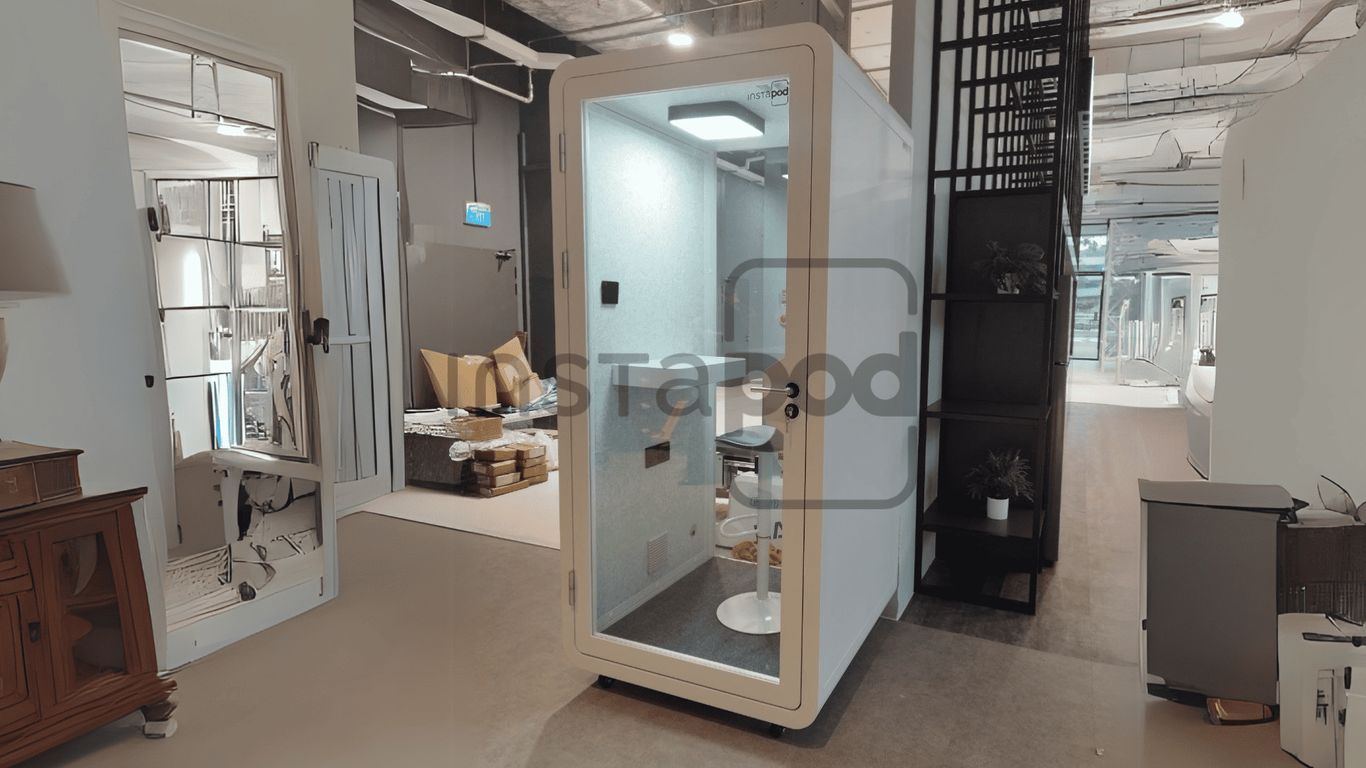
Let’s face it, video calls at work can be a mess. You’re trying to have a serious conversation, but there’s always someone walking by, printers whirring, or random chatter in the background. It’s distracting, and it doesn’t exactly make you look (or sound) your best. That’s why working pods are popping up in offices everywhere. These little private spaces are changing the way we do video calls—making them clearer, quieter, and way less stressful. If you haven’t tried one yet, you might be surprised at how much of a difference they make.
Key Takeaways
- Working pods give you a quiet spot for video calls, blocking out most office noise and distractions.
- They’re built with sound-dampening materials, so your calls sound clear and professional.
- Pods come with features like good lighting, ventilation, and built-in tech, making them comfy for longer meetings.
- You can find different sizes and designs, so there’s usually a pod that fits your office and how your team works.
- Using working pods instead of building new rooms saves money, time, and keeps your workspace flexible.
Why Working Pods Are Transforming Video Calls
Gone are the days when video calls meant everyone shouting over each other’s background noise or fighting for a quiet corner. Working pods have turned that upside down. These little private spaces (
modern meeting pods in open offices) are popping up everywhere, changing the way we handle remote communication. Now, calls feel less like survival and more like an actual conversation.
Boosting Audio Quality and Clarity
Video calls are only as good as the sound quality—if your audio is a mess, your whole message falls apart.
Working pods are designed with sound-dampening materials that shut out office buzz. Here’s a quick look at how pods compare to traditional open office spaces:
| Factor | Open Office | Working Pod |
|---|---|---|
| Audio Clarity | Low | High |
| Background Noise | High | Low |
| Professional Impression | Spotty at best | Consistent |
It’s not rocket science—when you remove the endless chatter and keyboard clatter, you stop battling the noise and start having real discussions.
Minimizing Office Distractions
Staying focused in an open-plan office? Good luck. But close yourself off in a pod, and suddenly, you can concentrate on the actual meeting instead of the circus outside. Here’s why distractions drop:
- Pods block visual interruptions—no more people waving or walking past your camera.
- Phone calls, printers, or even the hum of the air conditioner melt away behind the walls.
- Your thoughts aren’t hijacked by surprise conversations two desks over.
It’s a little like moving your desk to the quietest room in the house, even when you’re still smack in the middle of a busy office. And that means you stay with the call, not your wandering mind. Some pods even create a dedicated environment for focused work meeting pods in open-plan offices.
Creating a Professional Virtual Presence
You know that feeling when you show up to a meeting and your background is chaos? Not a good look. But step into a pod, and your video call backdrop is tidy, distraction-free, and honestly, it looks like you’ve got your act together—even when you’re in the middle of a noisy workspace.
- Background stays consistent and neutral.
- Lighting is designed to flatter, not wash you out.
- You don’t have to worry about camera angles catching a coworker’s lunch.
When everything just works—the sound, the background, even the lighting—you can focus on connecting with people, not covering up your workspace. That’s the real benefit working pods bring to your everyday video calls.
If you find yourself fed up with poor call quality and endless interruptions, consider looking at how
office pods designed for calls could make things smoother. It’s a small change, but your next meeting might actually feel like progress instead of just noise.
Key Features That Make Working Pods Effective
Working pods are more than a trendy addition to the modern office—they’re full of features that directly change how people work and communicate. The right mix of design choices can make all the difference between just another box in the corner and a valuable resource for better video calls and focus sessions. Here’s a breakdown of the most important qualities to look for.
Prioritizing Soundproofing and Acoustic Ratings
Good sound isolation is the main reason pods feel valuable: it lets you control the noise and have calls without all the annoying office chatter in the background. Quality pods use thick acoustic panels, sealed doors, and materials with high STC (Sound Transmission Class) ratings. This setup absorbs sound instead of bouncing it around, making conversations private and clear. Especially for HR talks or client calls, that’s a big win.
| Feature | Why It Matters |
|---|---|
| Acoustic wall panels | Stop outside noise and echo |
| Sealed construction | Keeps distractions out |
| High STC rating | Blocks sound leaks for privacy |
- Absorbs speech and reduces echo for better call quality
- Makes sensitive conversations secure
- Lowers frustration from background noise
Many people say they can actually hear themselves think in a work pod compared to the noisy open floor outside.
Ensuring Comfort with Ventilation and Lighting
Pods are used for everything from 5-minute check-ins to hour-long meetings. If they’re stuffy or uncomfortable, people won’t use them. Reliable pods have:
- Built-in ventilation fans for fresh air
- Soft, adjustable LED lighting to avoid eye strain
- Space for ergonomic chairs or even sit-stand desks
These little touches matter for anyone using a pod as their go-to video call spot.
| Comfort Feature | Benefit |
|---|---|
| Ventilation | Prevents overheating |
| Adjustable Desk | Fits a range of working styles |
| LED lighting | Reduces glare, eye fatigue |
Integrating Technology and Connectivity
Honestly, a pod with poor tech is just a fancy closet. The best pods are designed so you aren’t hunting for outlets or dealing with Wi-Fi dead zones. Look for:
- Multiple power outlets and USB ports
- Strong Wi-Fi signals, sometimes with boosters
- Optional screens or monitor mounts for easy video conferencing
This kind of thoughtful setup saves headaches and makes every call smoother. Just like office pods tailored for conferencing, these features mean you’re always ready for focused work, collaboration, or those last-minute all-hands meetings.
Pods that nail technology don’t interrupt your workflow—they blend right in, giving you privacy and tools you actually want to use.
Design Choices: Finding the Right Working Pod for Your Office
Every office has its quirks, and choosing the right office telephone booth or office phone booths isn’t a one-size-fits-all scenario. Let’s break down what you need to look at so you actually wind up with pods that pull their weight.
Selecting Appropriate Sizes and Capacities
Before you jump in, you’ve got to think about how the pods will fit. Not all teams sit in big conference rooms, and not every office has the same space to work with.
- Small, single-person office phone booths work well in tight corners or for individual video calls.
- Larger pods are best if you want a spot for team huddles or group calls (but measure carefully).
- Modular options can let you add or remove wall panels as your needs shift.
Here’s a quick table for comparing common pod sizes:
| Pod Size | Capacity | Recommended For |
|---|---|---|
| Compact | 1 person | Private calls, video meetings |
| Medium | 2–4 people | Team check-ins, small projects |
| Large | 6+ people | Group meetings, brainstorming |
Considering Portability and Flexibility
If you rearrange the office or switch up the layout more than once a year, look for pods you can actually move. Portable pods with wheels, lightweight frames, or easy assembly make it simple if you want to break up an open space or change things on the fly. Flexibility is key if you’re working in a hybrid office or flexible workspace—as many companies have found with adaptable office pods.
A few points to keep an eye on:
- Pick pods that won’t be a total headache to move when needed.
- Favor models that don’t require permanent installation.
- If you’re in a lease, portable pods avoid problems with major changes to the building.
Matching Pods to Your Workflow
You also need to match your pod setup to how your team actually works. Some offices are all about quick, private calls; others need pods for long brainstorming sessions. Don’t just buy the fanciest pod—think about actual usage:
- How often are video calls scheduled versus spontaneous?
- Is privacy or collaboration more important in your space?
- Do you need tech integration for screens, microphones, or booking systems?
Pick a pod that suits your daily rhythm, not just what looks cool in the catalog. A well-chosen pod keeps interruptions down and lets your video calls sound professional, without the office noise.
Tuning the design to your environment means everyone benefits—whether it’s a single-person office telephone booth tucked near a break room, or a suite of portable pods spread out for full privacy. Prioritize what actually matters for your office and your calls will instantly feel smoother.
Strategic Placement and Utilization of Working Pods
Getting the most out of working pods really comes down to where you put them and how people use them. If you just stick pods wherever there’s space, odds are they’ll get ignored.
Locating Pods for Maximum Accessibility
Pods need to be close enough so no one has to go on a scavenger hunt to find one. Place them near desks, main walkways, or even by break rooms. That way, when someone needs a quiet spot for a call, it’s not a hassle to step in.
Key tips for placement:
- Spread pods out so every department or team has easy access.
- Avoid hiding them in weird corners; keep them visible and inviting.
- Don’t crowd them all together—people value a quiet, separate space.
A simple table to show placement impact:
| Placement Option | Accessibility | Usage |
|---|---|---|
| Near workstations | High | Very High |
| By entrance or exit | Medium | Medium |
| Tucked away upstairs | Low | Rare |
When pods are easy to find and use, you’ll notice people stop pacing the office with laptops looking for a private spot—it just makes life easier.
Balancing Open Space and Private Zones
It’s easy to think pods are a one-size-fits-all solution, but they shouldn’t swallow up the entire office. You want to balance open areas, so the workspace doesn’t feel boxed in. Too many pods crowded together can make the space feel cramped. Instead:
- Put pods up against walls or use them to break up open areas,
- Leave enough space between for foot traffic and existing office flow,
- Mix solo and small group pods to match your team’s needs.
Encouraging Spontaneous and Planned Use
Pods shouldn’t only be for scheduled meetings. They work best when people know they can grab one for a quick call or focus session, no reservation needed. Consider:
- Having both reservable and first-come pods,
- Integrating a simple booking screen or app so people can check availability at a glance,
- Signage or glass doors to let folks see when they’re occupied.
- Make it clear: if pods are locked behind a complicated process, people won’t use them.
- Keep some pods open for impromptu use—those last-minute video calls happen all the time.
- Regularly review pod usage to see if you need more or less.
The main thing? Pods only work if they’re actually used. Placement and flexibility are what turn them from a nice idea into the quiet zones everyone relies on.
Working Pods and Employee Well-Being
Reducing Cognitive Fatigue Through Sound Isolation
If you’ve ever tried powering through a workday in an open-plan office, you know how draining that constant hum of noise can be. Workpods give your mind a break from the endless background chatter, keyboard clicks, and random distractions. By creating a physical barrier against office noise, these enclosed spaces cut down on the mental drain that comes from always filtering out distractions. With fewer interruptions, there’s more room for real focus—a chance for your brain to rest and recharge while you’re working.
Quiet work zones aren’t just for peace and quiet—they truly help your mind recover during busy workdays and let you get more done without feeling exhausted after every meeting.
Supporting Mental Health by Reducing Interruptions
Interruptions can seriously mess with your ability to get things done, not to mention raise your stress. Workpods step in as personal hideaways—from coworkers dropping by for a chat to impromptu group meetings that throw you off track. The walls around a pod aren’t just about privacy; they’re about granting a moment where you feel in control of your environment. This has a real impact on how stressed you feel, as well as your general mood through the day. People who have a dedicated, quiet place to work tend to be happier and more engaged, which in turn is better for everyone.
Quick benefits of fewer interruptions with workpods:
- Lower stress and frustration during intense work periods
- Easier to finish deep-focus tasks on time
- Better sense of privacy and self-control
For a closer look at how pods impact comfort and focus, check out these key factors that improve employee well-being with office privacy spaces.
Enhancing Concentration and Productivity
Let’s talk outcomes: the real-life changes that you notice after a few weeks with workpods around. The ability to step into a pod for video calls or head-down work means you stay locked in when it matters most. There’s no one tapping you on the shoulder every five minutes or background noise knocking you out of your groove. The numbers say it too:
| Before Pods | After Pods |
|---|---|
| Frequent interruptions (per hour) | 12 |
| Focused work blocks (minutes) | 15 |
| Tasks completed per day | 7 |
| Stress-related complaints | High |
| With workpods (per hour) | 3 |
| Focused work blocks (minutes) | 40 |
| Tasks completed per day | 12 |
| Stress-related complaints | Low |
Pods are a simple fix, but the boost they offer in terms of clear thinking and productivity is obvious after just a short time.
So, while workpods might look like just another office upgrade, what they really provide is a healthier, less stressful way to get through your day. This isn’t just about fancy furniture—it’s about making work feel a little less overwhelming and a whole lot more manageable.
The Role of Working Pods in Hybrid and Remote Workplaces
In today’s world, work isn’t tied to a single spot anymore. Hybrid and remote models, where people move between their homes and offices, need practical setups for video meetings that sound and look professional. This is where workplace pods truly stand out. They’re changing how teams connect from anywhere by bringing reliable, private spaces into the mix—whether you’re at headquarters or your kitchen table.
Providing Consistent Meeting Quality Anywhere
Switching between home and the office can be awkward—one moment you’re in a quiet spare room, next you’re wedged into a busy shared office. The problem? Inconsistent meeting quality. Workplace pods can even out those differences, offering solid soundproofing, a steady background, and a break from distractions so your calls don’t suffer no matter where you are.
- Makes audio and video quality reliable for everyone
- Cuts out background noise, boosting professionalism
- Offers privacy in both crowded offices and busy home spaces
Consistency is everything when it comes to virtual meetings—workplace pods take the randomness out and give everyone a fair shot at clear communication.
Workplace pods are an option many companies now explore to deliver professional video calls both in-office and at home. For a quick look at how different types work, check out self-contained pod solutions for hybrid work.
Bridging the Gap Between Home and Office Environments
Jumping between home and the office often means different levels of comfort and focus. Pods help bridge that gap, creating a stable, familiar work zone in both settings. For remote workers, a pod can turn a corner of the house into a private, dedicated office. For in-office days, pods transform open-plan chaos into peaceful meeting zones.
- Supports hybrid work models by giving everyone a reliable workspace
- Easy to move or install in compact spaces
- Designed with ventilation and good lighting for all-day comfort
There’s real impact here: pods make switching locations less chaotic and help everyone work in a more consistent way. From compact office booths to adaptable meeting pods, these options blend easily into flexible office layouts.
Defining Clear Work-Life Boundaries
It’s easy for work to bleed into home life, especially if your "office" is the kitchen table. Workplace pods draw a physical line—they signal ‘work mode’ as soon as you step inside. That’s good for both your productivity and mental health.
- Visually and physically separates work from leisure
- Reduces household distractions and interruptions
- Lets you log off, simply by walking out and shutting the door
Here’s a quick table to compare how workplace pods address common hybrid work pain points:
| Challenge | Traditional Setup | Using Workplace Pods |
|---|---|---|
| Noisy Backgrounds | Frequent | Rare |
| Lack of Privacy | Common | Minimal |
| Work-Life Overlap | High | Low (with dedicated pod) |
| Video Call Quality Variability | High | Low |
| Space Flexibility | Rigid | Modular, adaptable |
By building in privacy and flexibility, workplace pods can really smooth out the rough spots of hybrid work. They give people control over their workspace, no matter where they log in from.
Choosing Working Pods Over Traditional Meeting Spaces
When it comes to upgrading your office for better video calls and focused work, it’s hard to ignore how working pods outperform old-school meeting rooms. Let’s dig into what makes these pods such a practical choice over the usual drywall-and-conference-table combo.
Avoiding the Hassle of Conventional Construction
Let’s be real: building or renovating a regular meeting room can be a huge headache. The noise, dust, time commitment, and costs add up fast. Here’s why opting for pods cuts down the chaos:
- Install pods with minimal interruption to your daily workflow—no waiting on permits, no waiting weeks for the room to be ready.
- Pods fit easily into your current office layout, whether you’re in a cozy space or sprawling open-plan.
- They give you privacy and acoustic control without dragging your team through messy renovations.
Choosing pods removes a lot of the usual headaches that come with conference room construction—the process is smoother, faster, and way less disruptive.
Offering Flexible and Modular Solutions
Pods are not just set-it-and-forget-it; they’re designed to keep up as your workspace changes.
You can reconfigure, move, or even expand these pods as your business grows or your needs shift. Here’s what flexibility looks like in practice:
- Most pods are modular, so you can take them apart and move them if you’re rearranging your space or moving to a new location.
- They come in different sizes—from tiny solo phone booths to larger team pods.
- You can mix and match designs to fit your team’s habits instead of squishing everyone into the same kind of room.
Take a look at how meeting pods redefine small office spaces, making your layout more adaptive without all the hassle meeting pods redefine small office spaces.
Delivering Cost-Effective Privacy Enhancements
It’s no secret that traditional conference rooms require a big investment—between construction, furnishing, utilities, and maintenance, the bill adds up. Pods help you save without making the office feel cheap.
Here’s a quick comparison table to highlight some key points:
| Feature | Traditional Meeting Room | Working Pod |
|---|---|---|
| Installation Time | Weeks to months | Hours to days |
| Flexibility | Fixed permanent structure | Portable & modular |
| Cost | High initial + maintenance | Lower upfront, minimal |
| Privacy | Average sound insulation | Superior soundproofing |
| Disruption to Office | High | Low |
You’ll find that privacy pods are a cost-effective alternative to standard conference rooms. They’re easier to maintain, provide better sound isolation, and you avoid the downtime that comes with knocking down walls and rebuilding.
In the end, working pods are a real game-changer. They offer adaptability, save your office money, and skip the usual renovation headache while still looking sharp and being seriously practical.
Wrapping Up: Why Working Pods Make Sense
So, after looking at all the ways working pods help with video calls, it’s pretty clear they’re more than just a trendy office add-on. They give you a quiet spot to talk, help you sound better, and keep distractions out—stuff that’s actually useful when you’re trying to get work done. If you’re tired of background noise, awkward interruptions, or just want to look a bit more put-together on screen, a pod might be worth a try. It doesn’t have to be fancy, just something that gives you a bit of space to focus. At the end of the day, better calls mean less stress and more time to do your actual job. That’s something most of us could use.
Frequently Asked Questions
What is a working pod and how does it help with video calls?
A working pod is a small, private booth you can use at work or even at home. It’s built to block out noise and distractions, so your video calls sound clear and look more professional. This helps you focus better and makes your meetings go smoother.
Do working pods really block out all noise?
Most working pods are made with special materials that stop a lot of outside noise from getting in. While they might not block every single sound, they cut down noise so much that most people won’t hear what’s happening outside your pod during a call.
Are working pods comfortable to use for long meetings?
Yes, good working pods have things like fans for fresh air and lights you can adjust. They’re designed so you can sit inside for a while without feeling stuffy or cramped, making them great for longer meetings or focused work.
Can I move a working pod if I need to change my office layout?
Many working pods are built to be portable. This means you can move them around your office or even take them to a new space if your needs change. Some are heavier and meant to stay put, so it’s good to check before buying.
Are working pods only for offices, or can I use one at home?
You can use working pods anywhere you need a quiet space. They work well in busy offices, but they’re also great for people working from home who want to keep work and home life separate or just need a quiet spot for calls.
How do working pods compare to building a regular meeting room?
Working pods are usually faster and cheaper to set up than building a whole new meeting room. You don’t need to hire builders or make big changes to your office. Plus, pods can be moved or changed more easily if your needs change later.