No pods added to your quote request yet. Add some now for a free quote!
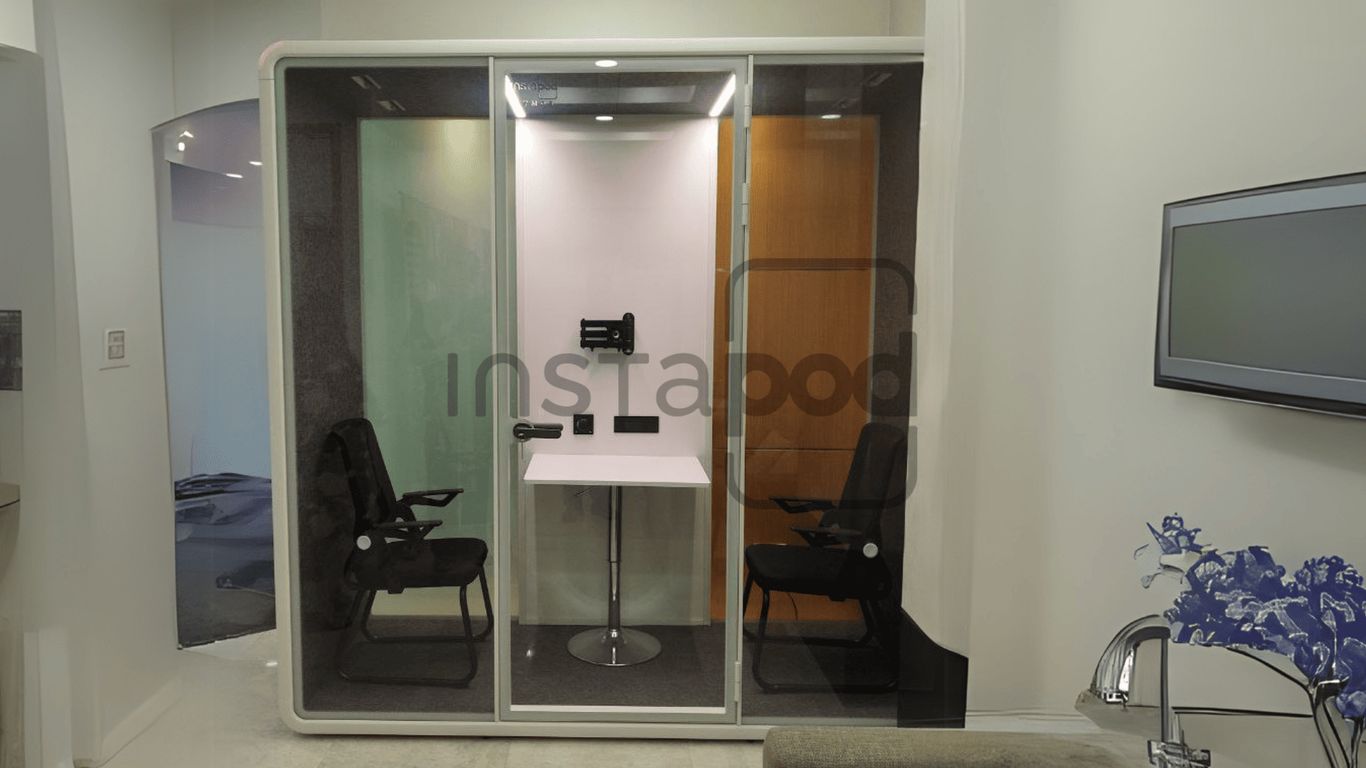
Video calls are just part of the work routine now, but let’s be honest—they’re not always easy in a noisy office. That’s where a meeting booth comes in handy. It gives you a spot to have a call without people walking by, chatting, or making background noise. With more teams working remotely or in hybrid setups, having a dedicated booth can really make video meetings smoother. If you’ve ever tried to join a call from a busy open office, you know how tough it can be. Meeting booths are popping up in more offices for a reason—they just make these calls a whole lot better.
Key Takeaways
- A meeting booth helps block out noise, making it easier to hear and be heard during video calls.
- Private booths cut down on distractions, so you can focus better and have more productive meetings.
- Modern meeting booths often come with built-in tech—like outlets and strong Wi-Fi—to keep video calls running smoothly.
- They’re flexible and can be moved or reconfigured, saving money compared to building new meeting rooms.
- Having a quiet, private space can boost employee comfort and job satisfaction, which is good for everyone.
How Meeting Booths Enhance Video Call Quality
Getting everyone together for a video call can be a challenge, especially in a busy office. That’s where meeting booths really make a difference. With a meeting booth, you get a space built for clear, focused communication—no more straining to hear or getting distracted by office noise. Let’s break down how these booths improve every virtual meeting:
Acoustic Isolation for Clearer Communication
Ever tried chatting on Zoom while folks shout across desks or someone runs the blender in the break room? Yeah, not fun. Meeting booths give you solid sound isolation so voices—yours and others on the call—come through way clearer.
- Thick, insulated panels block out random office noise.
- Built-in acoustic treatment cuts echoes and keeps voices crisp.
- Conversations stay private, so you can discuss sensitive topics worry-free.
| Booth Acoustics Benefit | Open Office | Meeting Booth |
|---|---|---|
| Call Clarity (1=Low, 5=High) | 2 | 5 |
| Privacy Level (1-5) | 1 | 5 |
| Disruption Risk (1-5) | 5 | 1 |
When calls actually sound clear and private, people are more confident to speak up. Better sound brings out better ideas.
Reducing Background Distractions
Even a great microphone can’t beat someone blasting music at their desk. With a booth, you cut out:
- Loud coworkers and hallway noise
- Office machinery humming in the background
- Unplanned interruptions and people passing by
This means you and your team stick to the topic—no more "Sorry, could you repeat that?" every five minutes.
Supporting Hybrid and Remote Teams
Today’s teams aren’t always in one place. Some join from home, others sit across town, and a few are in the office. Meeting booths give everyone in the office a shared, pro-level space for joining video calls. That way, remote folks aren’t left out, and in-person team members aren’t competing with background noise.
- Reliable, consistent sound and video setup every time
- Fewer technical hiccups for remote participants
- Everyone feels more included
All together, meeting booths make sure your next video call goes from "Can you hear me now?" to real progress—no matter where your team starts the day.
Boosting Productivity with Private Workspaces
Modern offices can be really distracting—not exactly the best setting for pulling off a focused video call or tackling a tricky project. That’s where private meeting booths start to make a lot of sense. They carve out dedicated areas where employees can think, talk, and work without constant interruptions. If you’ve ever tried to zone in on a task with people chatting nearby or phones ringing off the hook, you know how difficult that can be.
Minimizing Interruptions in Open Offices
Open offices sound nice in theory, right? Just one big space where everyone collaborates and ideas flow. But in reality, all that openness brings noise, small talk, and the ever-present foot traffic. Meeting booths change the game by offering a quick escape from all that chaos. Here are a few ways they help:
- Weekly huddles or client calls don’t have to compete with background chatter.
- Anyone can duck inside for a last-minute meeting without booking a huge conference room.
- Workers with focus-heavy roles can step in and work in total silence for a while.
If your floor plan is full of distractions, these booths create private productivity zones. In fact, office booths provide quiet, private spaces that cut down on unnecessary interruptions so you can get more done.
Improving Focus During Video Conferences
Ever start a video call confident, only for someone’s ringtone or hallway laughter to derail the conversation? That’s a common frustration in busy offices. Meeting booths are soundproof (or at least much quieter), which means:
- You hear your team clearly, and they hear you.
- You’re not worried about someone accidentally photobombing your webcam.
- Longer calls stay more productive because external distractions are blocked out.
Just having a door you can close goes a long way toward holding a real conversation—especially if you’re meeting with clients or presenting to your boss.
Supporting Confidential Discussions
Sensitive topics sometimes pop up—HR chats, project launches, negotiations. A private booth allows these types of conversations to stay private, without the risk of someone overhearing. Simple things like discussing upcoming mergers or personal issues need a space that respects discretion. Here’s why a booth is a good bet:
- Fewer leaks of confidential information.
- Employees feel safer voicing concerns in a closed space.
- It’s easier to comply with data privacy rules.
There’s peace of mind having a tucked-away corner just for those conversations you don’t want the whole floor knowing about.
No more fighting for a free meeting room or hoping the person next to you’s headphones are good enough. Private workspaces are pretty straightforward, but their effect on daily productivity is massive.
Tech Integration: What to Look for in a Modern Meeting Booth
Technology should make every meeting smooth, not turn it into a headache. Picking a meeting booth with the right tech features will help your day go by a whole lot easier, especially when remote work is on the table. Let’s break down some things worth considering so you don’t end up frustrated by laggy screens or echoing audio.
Ensuring Reliable Connectivity for Video Calls
Strong, stable internet is the backbone of good video calls. If your booth can’t guarantee a steady connection, nobody’s getting anything done. Here’s what to keep in mind:
- Wired and wireless options: Some people prefer plugging in, others rely on Wi-Fi. Good booths offer both options.
- Enough power outlets: Laptops, phones, tablets—all need charging at some point.
- Network security: A separate, secure connection for meetings is always a smart move, especially for confidential chats.
When you walk into a modern meeting pod, it should feel like stepping into a mini office that just works—no hunting for chargers or dropping calls halfway through an important client check-in.
You’ll find many companies moving away from clunky conference rooms and shifting toward meeting pods that come prewired and ready from day one (modern meeting pods).
Essential Built-In Features
A great meeting booth comes packed with features that keep things simple but productive. Look for these details:
- Built-in screens or monitor mounts for easy screen sharing
- Integrated soundproofing for clearer audio—no more background chatter
- Lighting controls for video (nobody likes looking like they’re in a cave)
| Feature | Why It Matters |
|---|---|
| Monitor Mounts | Comfortable video calls & presentations |
| Soundproofing | No distractions during meetings |
| Lighting Controls | Professional-looking video quality |
| Air Circulation | Comfortable even in longer meetings |
Even little things like USB charging ports or wireless charging pads mean fewer distractions. Pods these days can be customized for privacy and the kinds of tech your teams actually use.
Adapting Booths for Future Technology
Tech changes fast, and what’s fancy today can be ancient in just a couple years. Make sure your booth can keep up:**
- Modular wiring setups that make it easy to switch out equipment
- Adjustable screens or mounts for new devices
- Space for upgrades, like better microphones or cameras
Don’t get stuck with a setup that’s impossible to rebuild later. Look for booths made to be flexible, so when your company upgrades tech, you don’t have to gut the whole thing.
You might be surprised at how well some booths handle future needs, letting you add or swap features as you grow (pods for meetings).
A well-equipped meeting booth isn’t about showing off—it’s about making every call and team huddle less of a hassle. When tech just works, people notice… and the work actually gets done.
Flexible Solutions for Evolving Office Needs
Switching up your office space to keep up with growth, new projects, or a changing workforce used to mean knocking down walls or booking expensive renovations. Not anymore. Meeting booths are the plug-and-play answer for teams that need flexibility without the fuss. Let’s get into how these work in the real world.
Cost Savings Over Traditional Meeting Rooms
Not everyone has the budget (or the patience) for permanent renovations. Meeting booths let you:
- Avoid construction costs, delays, and disruptions.
- Choose hardware that fits your budget and can move with you.
- Free up funds for other needs like team events or new tech upgrades.
Take a look at how the expenses shape up over time:
| Expense Type | Traditional Meeting Room | Meeting Booth |
|---|---|---|
| Initial Setup Cost | $$$$ | $$ |
| Moving/Relocation Cost | $$$ | $ (portable) |
| Construction Time | Weeks/Months | 1-2 Days |
| Flexibility | Fixed | High |
This table makes it pretty obvious why office phone booths are a smart, multi-functional asset for any growing business.
Modular and Movable Design
One day you’re a team of ten, next year you’re pushing fifty. With modular booths:
- Rearrange booths as your layout changes.
- Move units easily during office reshuffles or even to a new location.
- Scale up or down by adding or removing booths—no headaches.
They’re basically the office furniture of private spaces. If you decide to update your look or add more booths, it’s as simple as picking the right size and style for your needs. Some booths even have features to match current design trends, so your office stays modern.
Making the Most of Office Space
It’s tough to make every square foot count, especially in open offices. Booths let you:
- Create focused work zones in underused corners.
- Place meeting or phone pods where people actually need them—next to workstations, or even near social areas.
- Design a workspace that adapts to new ways of working, whether that’s group projects, quick huddles, or solo video calls.
A modular meeting booth can transform a forgotten corner into the most in-demand spot for private work or quick meetings—no drywall required.
As workplace needs shift, privacy booths can be reconfigured, moved, or repurposed without missing a beat. The days of being boxed in by your office layout are over.
Promoting Employee Well-Being and Satisfaction
Meeting booths aren’t just about taking calls—they actually make a big difference in how people feel at work every day. Let’s break down why these little spaces matter so much for well-being and job satisfaction.
Providing Quiet Zones for Stress Relief
Ever tried reading an important document in the middle of a busy office? It’s like trying to meditate at a train station. Having a dedicated quiet pod gives people a place to breathe, regroup, or take a personal call without the awkwardness of the open floor.
- Quick escapes from office noise
- Handy for private calls about personal matters
- Lower overall stress for everyone
Sometimes what people really need is just a moment away from the noise to recharge, and that makes all the difference by the end of the week.
Enhancing Privacy and Comfort
Not every chat is meant for public ears. Whether it’s a sensitive call or you’re hashing out tricky project details, privacy is valuable. Modern meeting pods were built for this—they keep things “in the booth.” Some even have features like soundproofing and frosted glass. According to what’s shared about soundproof meeting pods, these can really make people feel more comfortable handling sensitive stuff without leaving their workspace.
- Prevent conversations from leaking out
- Feel safe discussing confidential topics
- More control over your work environment
Increasing Job Satisfaction and Retention
Spaces that support people’s needs show that a company cares. When employees know they can step into a pod for focus or privacy, they’re way more likely to stick around for the long haul. Companies often see improvements in:
| Factor | Without Meeting Booth | With Meeting Booth |
|---|---|---|
| Employee Satisfaction | 70% | 87% |
| Reported Stress Levels | Moderate | Low |
| Desire to Stay | 60% | 84% |
So, meeting booths aren’t just a nice addition—they actually help people work and feel better, which makes a huge difference for everyone at work.
Maximizing Versatility in the Workplace
Meeting booths aren’t just little rooms off to the side—they’ve become adaptable spaces that fit the way work is really happening these days. The best part? These booths aren’t stuck being used for just meetings; they can switch purposes whenever the team needs them to. It’s a simple fix that gives flexible options, especially in offices where people are moving between remote, hybrid, and in-person styles.
Supporting Individual and Group Work
- Need a spot to focus? Solo booths provide quiet and privacy, especially for video calls or deep work.
- Working with a team? Larger meeting booths can host small groups for brainstorming or quick check-ins.
- These booths often double as temporary offices or even break zones during a hectic day.
Repurposing Booths for Multiple Uses
- Quiet space for focused work or making confidential calls
- A place for quick huddles, impromptu one-on-ones, or even private relaxation
- Temporary workspace for visitors, project-based teams, or anyone who just needs a change of scene
| Booth Use | Common Purpose |
|---|---|
| Solo Booth | Video calls, phone meetings |
| Medium Booth | Team syncs, interviews |
| Large Booth | Team collaboration sessions |
| Repurposed Booth | Relaxation or wellness break |
You get more out of your office layout by choosing furniture and booths that can move and change right along with your needs. Tomorrow, when your team grows, or your work style shifts, those same booths still fit.
Integrating with Dynamic Office Layouts
- Booths roll or lift to a new spot when the office floor plan gets updated.
- Mix-and-match layouts keep private, social, and collaborative work within reach.
- Can be set up near main work areas or tucked away for added quiet—whatever helps most that week.
If you’ve ever grumbled about a conference room that always sits empty or wished you had just one spot to take a private call, meeting booths make sure office real estate isn’t wasted. Versatility is just another way they prove their value every day.
Practical Tips for Optimizing Video Calls Inside a Meeting Booth
Setting Up Lighting and Camera Angles
The light in your booth can totally change how you come across on screen. Natural light is great, but not everyone has a window. If you’re using artificial lights, place them in front of you (not above or behind) to avoid weird shadows.
- Try to use soft white lighting for the most flattering appearance.
- Adjust your camera to be at eye level; stacking your laptop on a few books works if you need to raise it.
- Avoid sitting with a window or bright light source directly behind you—it can cause your face to look dark.
A quick table might help you figure out how lighting and camera position affects your call:
| Setup | Result |
|---|---|
| Front-facing light | Even, clear video |
| Overhead light | Unflattering shadows |
| Backlit (window) | Face appears dark and unclear |
| Camera below chin | Unnatural angles, less engaging |
Even just tidying up your camera angle and lighting can make you look more present and professional, turning a basic booth into your own video studio.
Preparing for Professional Virtual Meetings
Prep is key—even with a private meeting booth. Bring everything you need before the call starts so you’re not scrambling mid-meeting.
- Close unnecessary apps, and silence notifications to keep things distraction-free.
- Have water or coffee nearby so you don’t need to leave the booth mid-call.
- Place any notes or talking points where you can see them but off-camera—sticky notes on your monitor work well and don’t distract others.
- Test the internet connection in your booth beforehand, as stable connectivity makes everything run smoother. In fact, many office booths come ready with strong wi-fi and charging outlets.
Maintaining Etiquette During Video Conferences
Good manners matter, even through a screen! Sometimes, the fact that you’re in a private booth can make it feel a bit too relaxed—but remember, you’re still at work.
- Mute yourself when not speaking, so background noises (even in a booth) don’t disrupt the call.
- Don’t eat meals during the call—quick sips are fine, but save lunch for later.
- Stay present—no texting or e-mailing during the meeting.
- Make eye contact with the camera when speaking, not just the screen, to help you connect with folks on the other end.
- Wrap up meetings on time; if you need a few extra minutes, check with everyone before going over.
A little bit of effort makes everyone’s meeting experience better, and turns those quick catch-ups in the booth into something people actually look forward to.
Remember, optimizing your booth setup takes a few tries, but the pay-off is smoother, more focused, and actually productive calls—without the distractions of a busy office. If you’re curious about more ways office phone booths support video calls, explore their privacy and productivity benefits in open workspaces.
Conclusion
So, after looking at everything, it’s pretty clear that meeting booths are more than just a trendy office feature. They actually solve a bunch of real problems—noise, distractions, and the constant hunt for a quiet spot to take a call. I’ve seen how much easier it is to focus when you can just step into a booth and shut the door behind you. Video calls go smoother, people don’t have to worry about everyone overhearing, and you don’t get that awkward background chatter. Plus, these booths don’t take up much space and can move with you if your office changes. If your team is tired of fighting for meeting rooms or just wants a little more peace and quiet, a meeting booth might be the answer. Honestly, it’s a simple fix that can make a big difference in how you work every day.
Frequently Asked Questions
What is a meeting booth?
A meeting booth is a small, quiet room or space in an office where people can work, make phone calls, or have video meetings without being disturbed by noise or distractions from the rest of the office.
How can a meeting booth improve video calls?
Meeting booths block out background noise and distractions, so your video calls are clearer and more private. This makes it easier to hear and focus, which helps everyone communicate better.
Are meeting booths easy to move if our office changes?
Yes, most meeting booths are designed to be moved. They are modular, which means you can take them apart and set them up again in a new spot or even a new office if needed.
What features should I look for in a meeting booth for video calls?
Look for booths with good soundproofing, strong internet connections, power outlets, and comfortable lighting. Some booths also have built-in screens or cameras to make video calls even easier.
Do meeting booths help with privacy at work?
Yes, meeting booths give you a private place for important talks, video calls, or focused work. This helps keep sensitive information safe and lets you have conversations without worrying about being overheard.
Are meeting booths a good choice for small offices?
Absolutely! Meeting booths don’t take up much space and can fit in different parts of the office. They are a smart way to add private work areas without building new rooms or making big changes.